
An ERP system is good at recording facts: an order has been created, goods have arrived, a payment has been received, and a manufacturing document is ready. But between a fact and a result, people almost always have work to do — notice a discrepancy, ask a question, involve a colleague, agree on a decision, and verify its completion.
Collaboration in Skynum connects this teamwork to ERP data. Discussions take place next to a document, payment, counterparty, product, or task. Replies and @mentions direct the right person's attention. Notifications arrive in real time and return them to a specific comment, while tasks turn decisions into actions with an assignee, a due date, and a recorded result.
A simple rule: discuss work next to the data, address a specific person through a reply or @mention, and create a task for an agreement that must be completed and monitored.
Not another chat, but work in context
In a regular messenger, messages exist separately from business records. To explain a situation, you have to copy the document number, counterparty name, amount, product lines, and change history. The decision eventually remains in the conversation, while the next participant has to reconstruct the context again.
In Skynum, the working object itself is the starting point. A comment about a goods receipt is already located next to that receipt, a payment clarification is next to the payment, and a question about a product attribute is in the product card. Participants see current data and discuss the exact situation they are working with.
Comments are available in tasks, documents, payments, counterparty and contact person cards, products, and modifications. This gives sales, warehouse, finance, procurement, and manufacturing teams one clear collaboration principle.
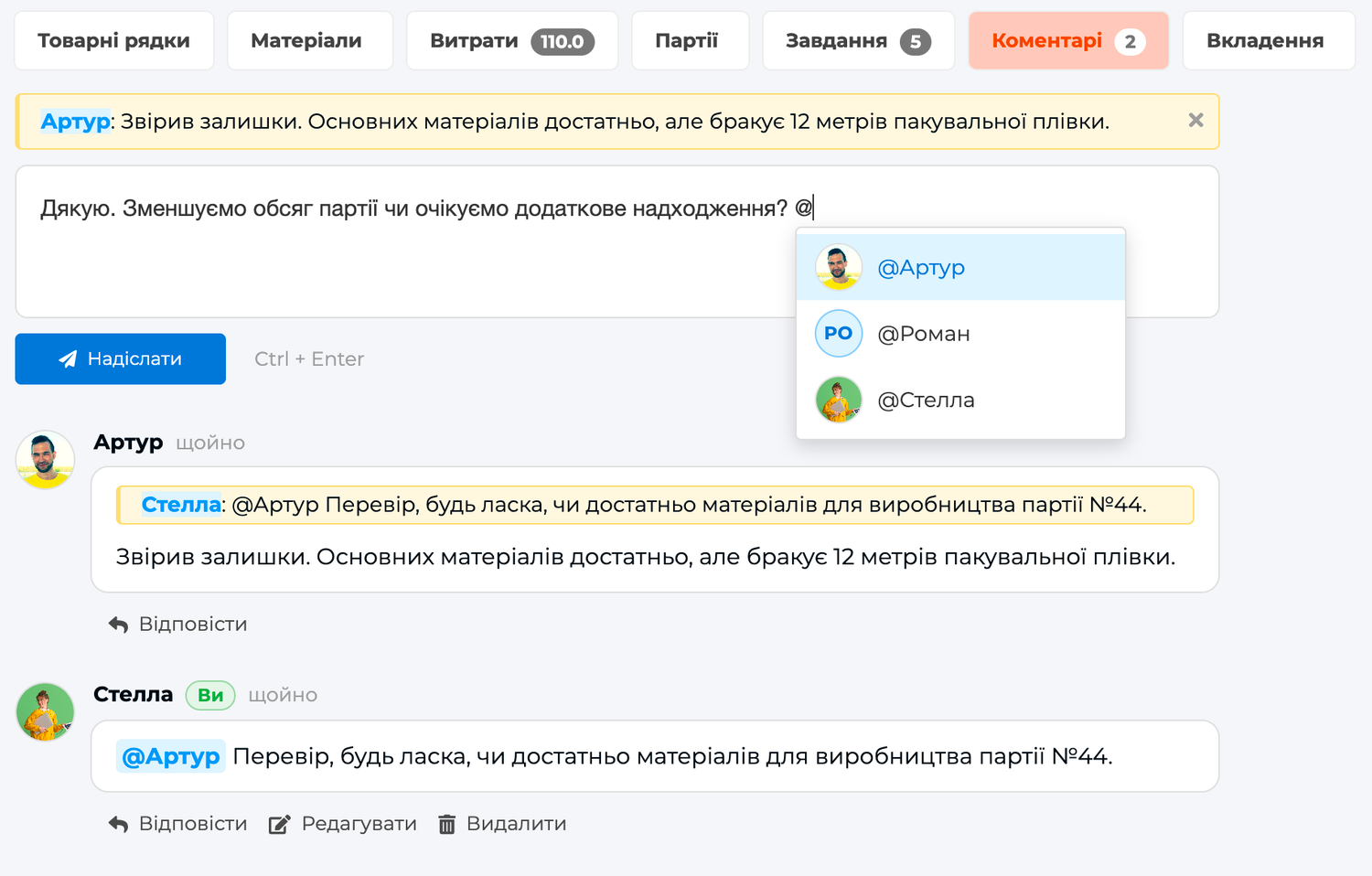
What the complete workflow looks like
- Open the source of the issue. The team starts with the document, payment, counterparty, product, or task that already contains the relevant data.
- Record the question. Briefly describe in a comment what happened, why it matters, and what decision is needed.
- Involve the right person. Click Reply to continue a specific comment, or select a colleague using @.
- Make the decision in the same context. The recipient immediately sees a new event by the bell and follows the notification to the exact comment.
- Create an accountable action. If the decision requires work, create a task, select one assignee, and set a due date.
- Record the result. Make the actual changes in the relevant accounting fields, leave a summary in a comment, and complete the task.
This turns communication into a manageable process. The issue is not merely discussed — it moves from data to a decision, accountability, and a result.
Practical example: a discrepancy in a goods receipt
While receiving a delivery, a warehouse employee notices that the actual quantities of two items do not match the goods receipt document. If they report this in a separate chat, the manager has to find the document, confirm its number, and compare the products manually. In Skynum, the process begins directly in the goods receipt.
- The warehouse employee opens the “Comments” tab and specifies which items and quantities need to be checked.
- They use an @mention to involve the procurement manager. The manager receives a targeted notification and opens this exact comment in the relevant document.
- The manager clicks “Reply” and records the result of the supplier verification. The reply keeps a link to the original comment.
- If the goods need to be recounted, a task is created from the document for the responsible warehouse employee, with a specified due date.
- The assignee opens the goods receipt from the task, checks the quantity, leaves a summary, and clicks Complete.
- The correct result is entered in the document. Comments preserve the explanation and decision, while the accounting fields contain the actual data.
As a result, the team sees the complete history: what was discovered, who was involved, what decision was made, who was assigned the action, and how it ended. Context does not become scattered, and accountability does not remain a verbal agreement.
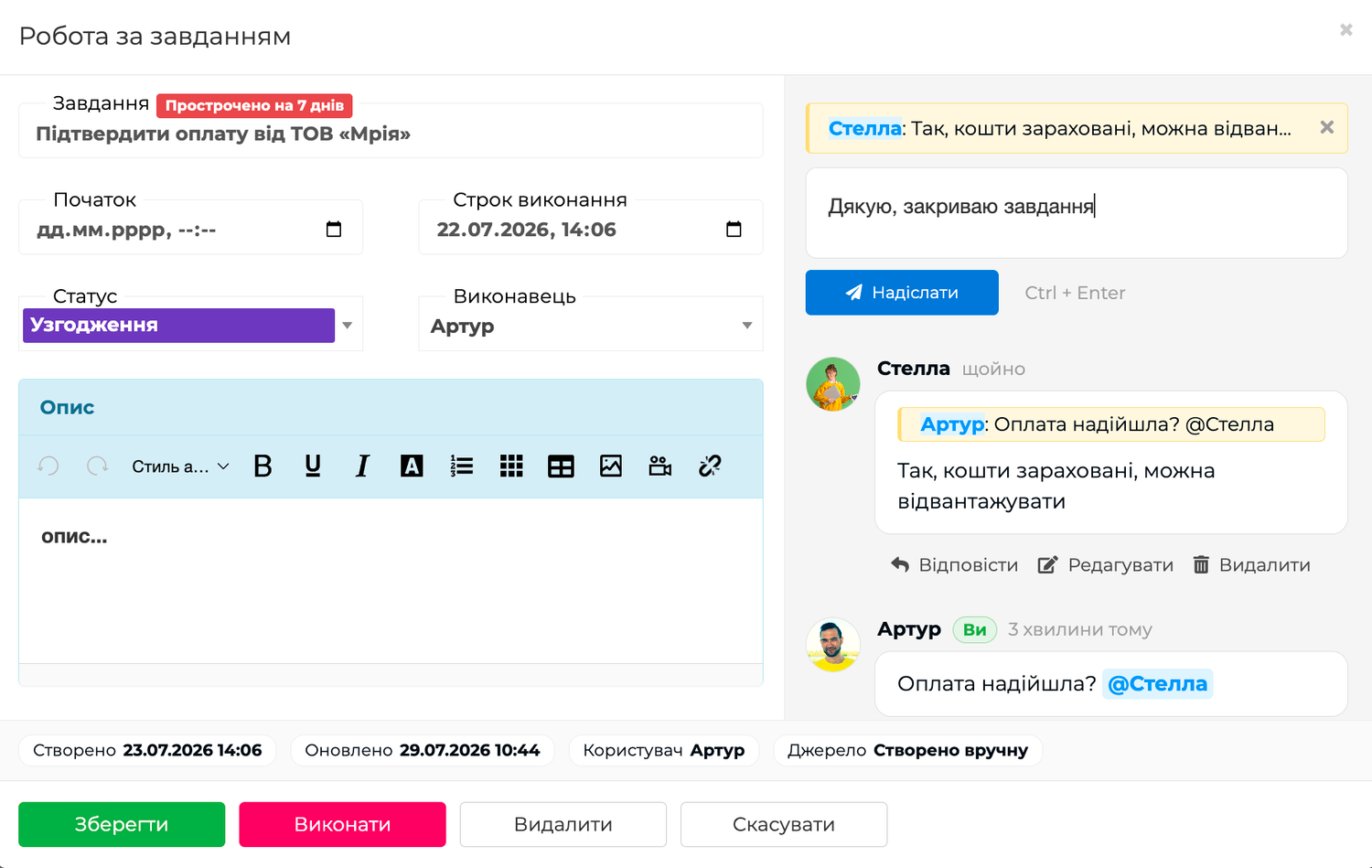
Comments create a work discussion
In the interface, every message is called a comment. Together, comments, replies, and @mentions form a work discussion around a specific object.
Comments are useful for:
- asking a question about a document or payment;
- explaining the reason for a change;
- recording an agreement;
- leaving the result of a review;
- passing important context to the next participant.
A comment explains an accounting transaction but does not execute it. Enter the payment amount through a payment, the quantity in the product lines, the assignee in the corresponding field, and change the document status using its status. This way, the text preserves the meaning of the decision while the ERP continues to work with accurate structured data.
Replies and @mentions direct attention
Use Reply when you are continuing a specific comment. Its author receives a notification, and the new comment keeps a link to the original message. Even in a long discussion, it remains clear which question has been answered.
An @mention involves a colleague who has not yet participated in the conversation. Enter the @ symbol, start typing a name, and select an active user from the list. The recipient receives a notification that links directly to this comment.
An important distinction: an @mention means “pay attention to this comment.” It does not make the person responsible for completing an action. Use a task for accountable work.
A task turns a decision into a result
Once the discussion makes it clear what needs to be done, a task is created. It defines the action, one assignee, the start time, the due date, and the fact of completion.
A task can be created separately or directly from a document, payment, counterparty card, or messenger conversation. In a linked task, the assignee immediately sees the subject of the work and can open it without searching or asking for the situation to be explained again.
A comment and a task do not duplicate each other:
- A comment stores the question, explanation, decision, and summary.
- A task stores the action, responsible person, deadlines, and completion.
For details about the personal list, unassigned queue, due dates, statuses, manual drag-and-drop ordering, and completion, read the separate article “Tasks in Skynum: from assignment to completion”.
Notifications deliver events in real time
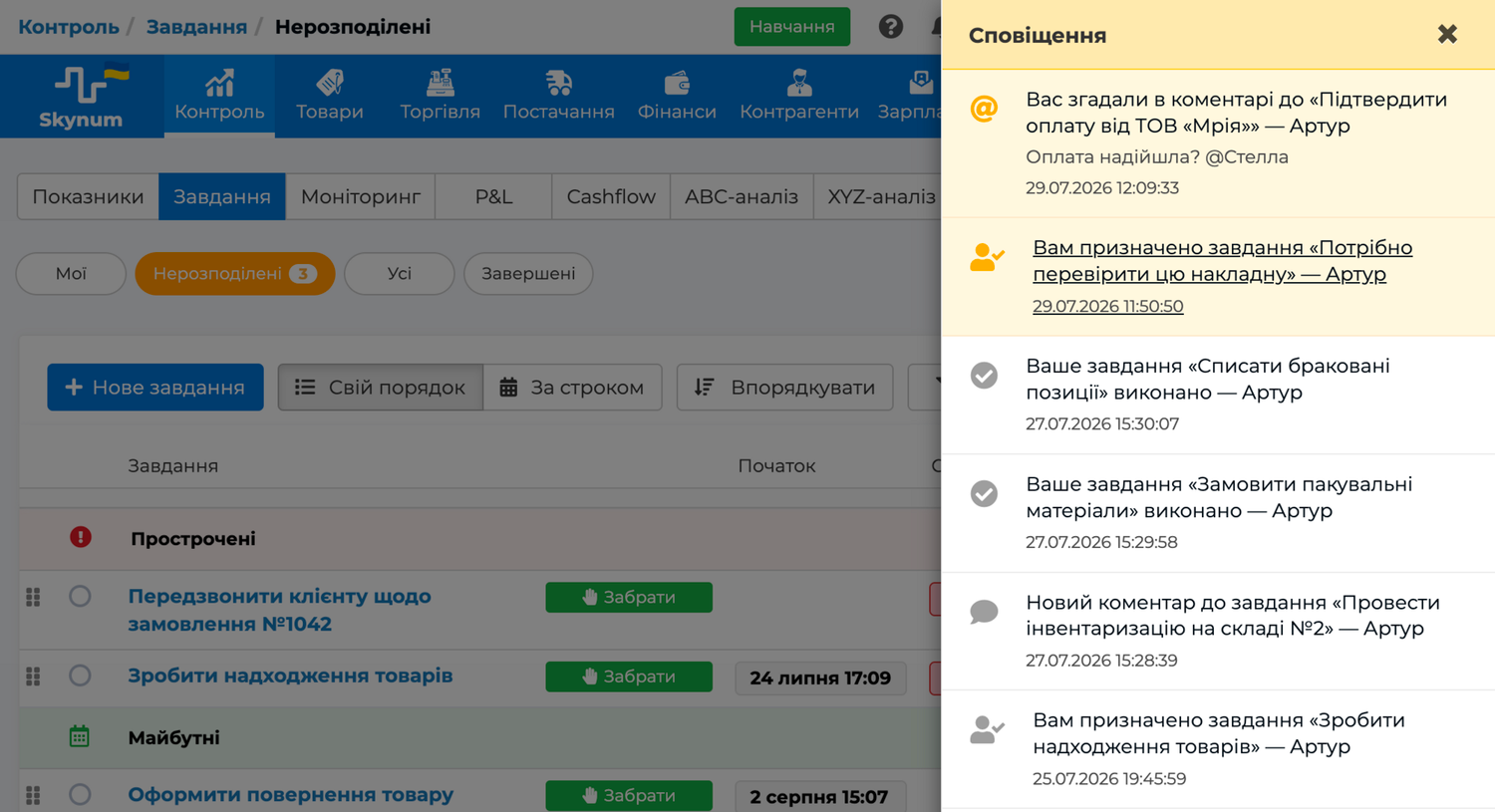
When a colleague is mentioned with @, someone replies to their comment, a new comment is added to their task, or work is assigned to them, there is no need to refresh the page. A short message immediately appears on the screen, and the counter next to the bell shows new unread events.
The side panel shows the reason for the notification, the work object, the person who performed the action, the beginning of the comment, and the time. For example, A reply to your comment and You were mentioned in a comment are different targeted events. Opening the panel clears the current counter, but the entries remain in the history.
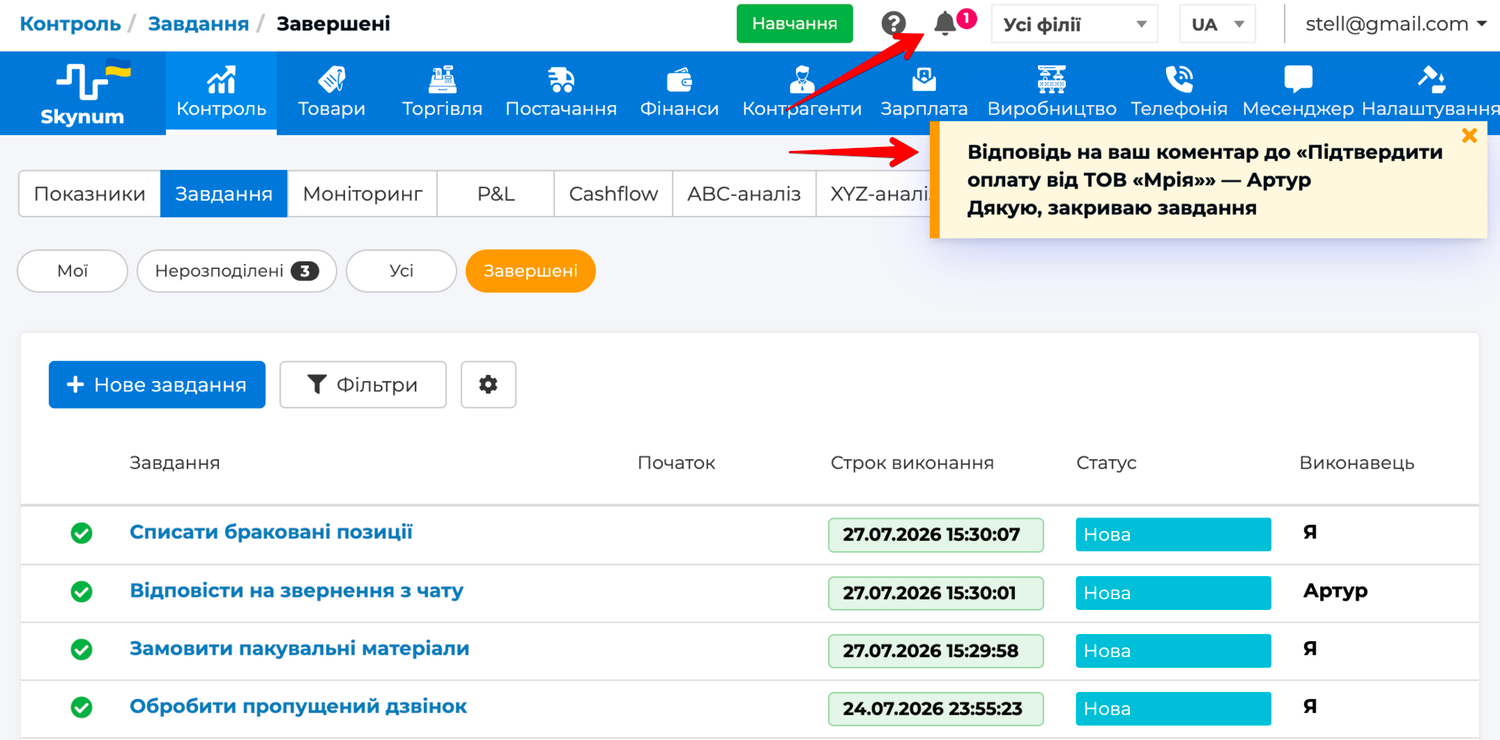
Clicking a comment notification opens the related task, document, payment, counterparty, contact person, product, or modification and scrolls the page to the relevant comment. If one person is simultaneously the recipient of a reply, a mentioned user, or a task participant, they receive one notification for that specific comment. Each subsequent comment remains a separate event, so the discussion history is preserved.
How it works across different processes
Finance
A manager sees an order without a confirmed receipt of funds, addresses a finance specialist in a comment, and creates a linked task for the check to be completed by the end of the day. The result remains next to the payment or document instead of in a private conversation.
Manufacturing
Before starting a manufacturing document, a production engineer notices a question about a material. They mention the person responsible for the warehouse in a comment, receive clarification, and create a task to check the stock and prepare the raw materials before manufacturing begins. The team sees both the reason for the decision and the person responsible for preparation.
Products and counterparties
In a product card, the team can clarify an attribute or record a decision about a modification. In a counterparty card, they can preserve important context about working with a customer or supplier. An @mention involves the right specialist, while replies preserve the sequence of the discussion.
Access rights remain under control
An @mention or notification does not reveal restricted data. A user can open a document, payment, task, or another object only when their role has the corresponding viewing permission. This keeps teamwork within the same access model as the accounting data.
How to introduce a collaborative process to your team
Start with one recurring workflow, such as discrepancies in goods receipts, payment control, or manufacturing preparation.
- Choose the work object next to which the team will keep the discussion.
- Agree to write complete comments: what happened, what decision is needed, and what should happen next.
- Use replies and @mentions purposefully so that the right person understands the reason they were contacted.
- Create tasks for actions that need to be monitored instead of leaving assignments only in comments.
- Record the summary and completion so that the next participant can see the result without asking additional questions.
Complete documentation with examples and exact rules is available in the Collaboration section. Detailed instructions for configuring and using tasks are available in the Tasks section.
Summary
Collaboration in Skynum creates a continuous path from an ERP fact to a team result. Data provides context, comments preserve the discussion, replies and @mentions direct attention, notifications return users to the right place, and tasks record accountability and completion. As a result, decisions are not lost across communication channels, and the team's work remains connected to real business operations.