The phone is the fastest sales channel: a customer calls when they are ready to buy or when they have a problem. But without a link to your records, a call lives on its own: the manager asks a regular customer for their name again, missed calls are jotted down on scraps of paper, and a month-old agreement can no longer be found.
Telephony in Skynum connects calls directly to the ERP. During an incoming call, the system shows who is calling, what the customer's debt is and which orders are open. Every conversation is stored in the log with a recording, a missed call automatically becomes a callback task, and the manager sees in analytics whether the company is losing inquiries.
Simple rule: no incoming call should get lost. During the conversation, the manager sees who they are talking to, and for a missed call the system creates a callback task on its own.
What the Workflow Looks Like
- Connect the company's telephony. Create an integration and match employees with their phone lines.
- Answer knowing the customer. During an incoming call, look at the customer card, not a bare number.
- Record the outcome. After the conversation, add a note, create a task or an order directly from the call.
- Keep track of missed calls. Automatic callback tasks will not let you forget a customer who could not get through.
- See the big picture. Analytics will show line load, answer rate and each manager's performance.
The Manager Sees Who Is Calling
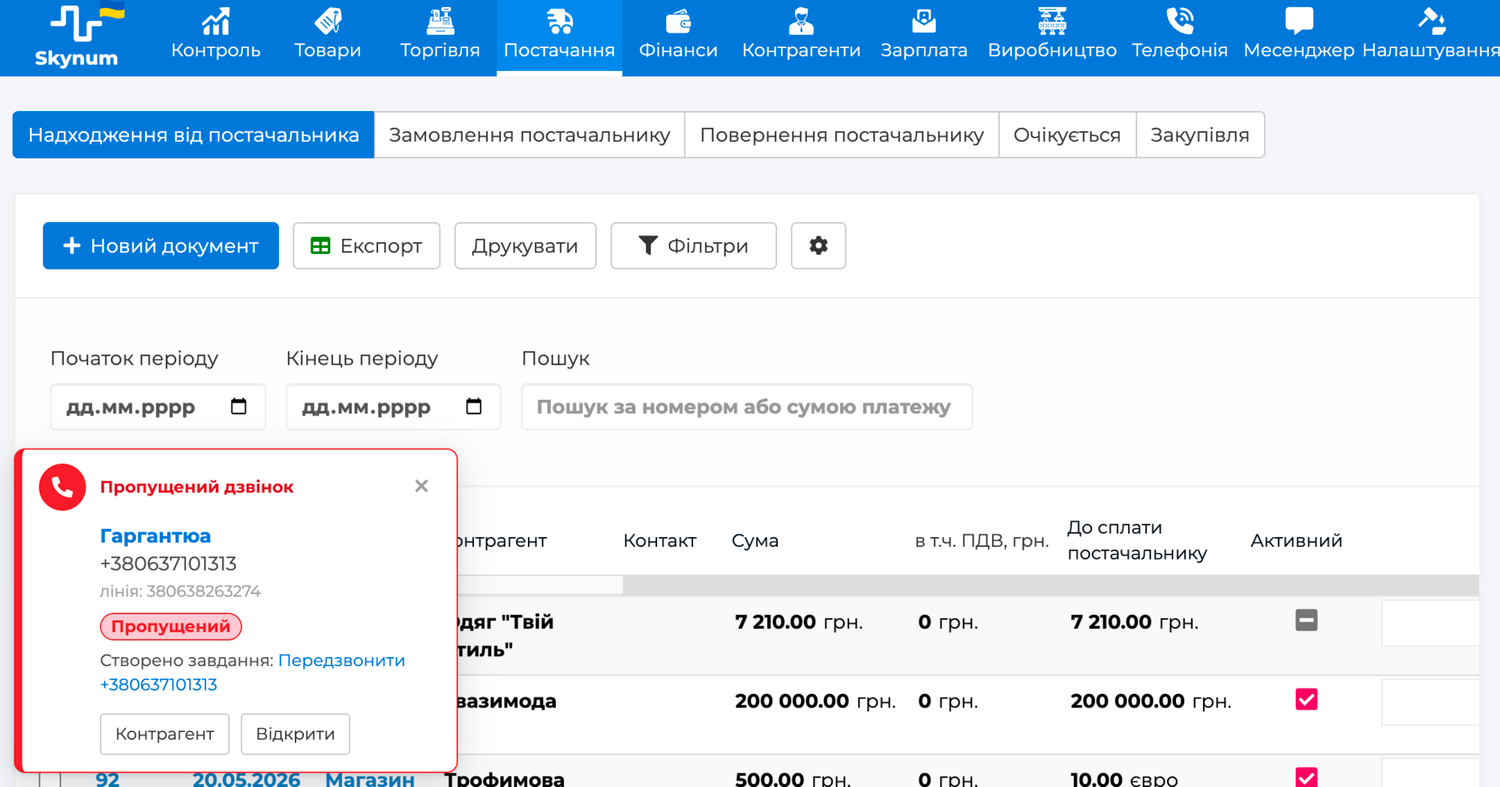
When a customer calls the company line, a call card appears in the corner of the Skynum screen. It works on any page of the platform: the manager can be filling in a document or viewing the warehouse — the call will find them.
For a known number, the card immediately shows the customer name, contact person, debt and open orders. The Counterparty button opens their card. The manager greets the customer by name and understands the situation before the customer says a word.
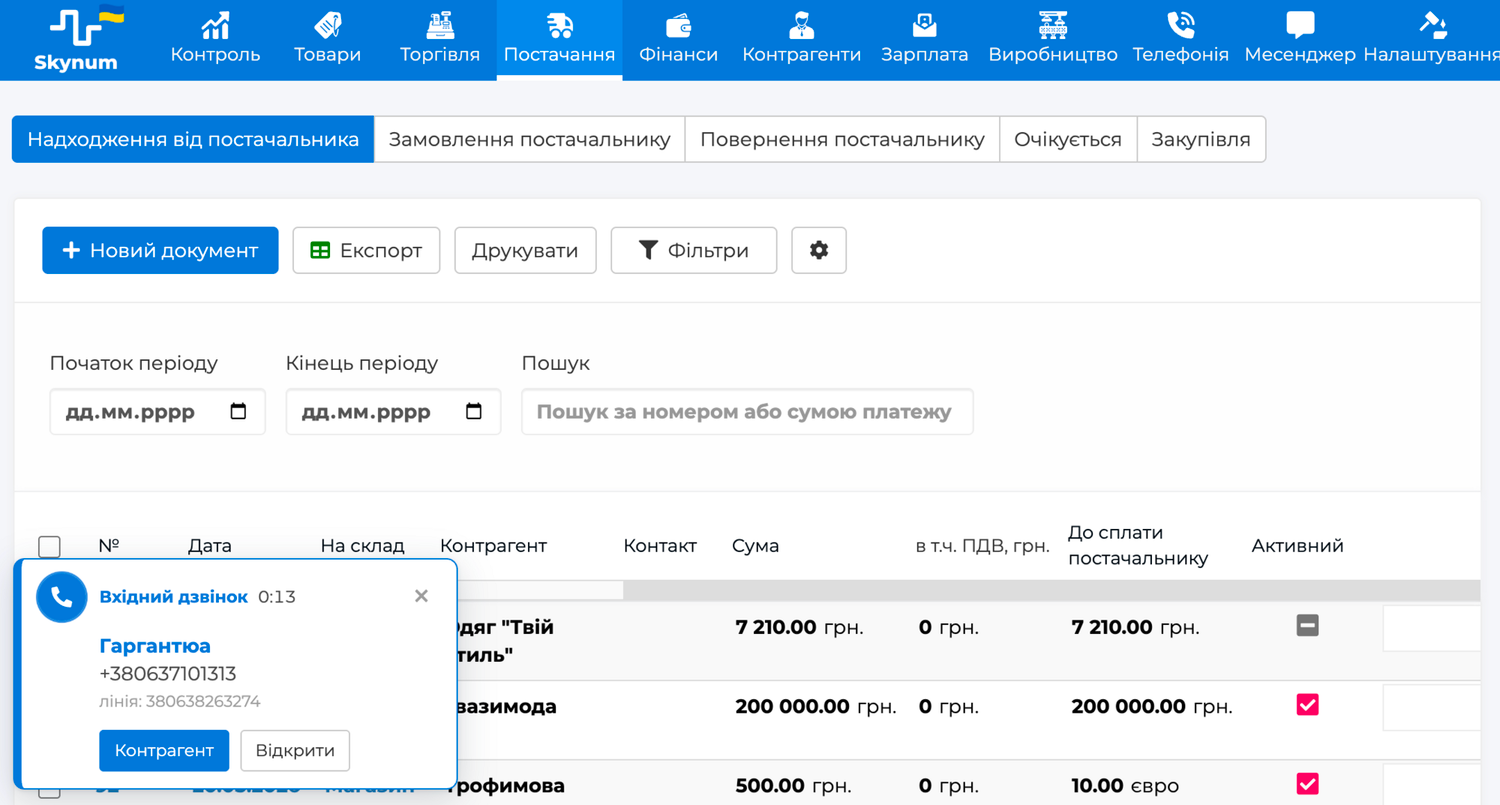
If the number is not in the database, the card offers two actions: Create counterparty or Link the number to an existing one — as the main phone or as the phone of a new contact person. This way the customer base grows right during the conversation.
Smart routing works for regular customers: if the Responsible field is filled in the counterparty card, the telephony first connects the customer to their own manager, and only then to the rest of the team according to the usual scenario. This is configured in the telephony account, and call control always stays with the telephony: Skynum only suggests the priority destination.
Call Log and Call Card
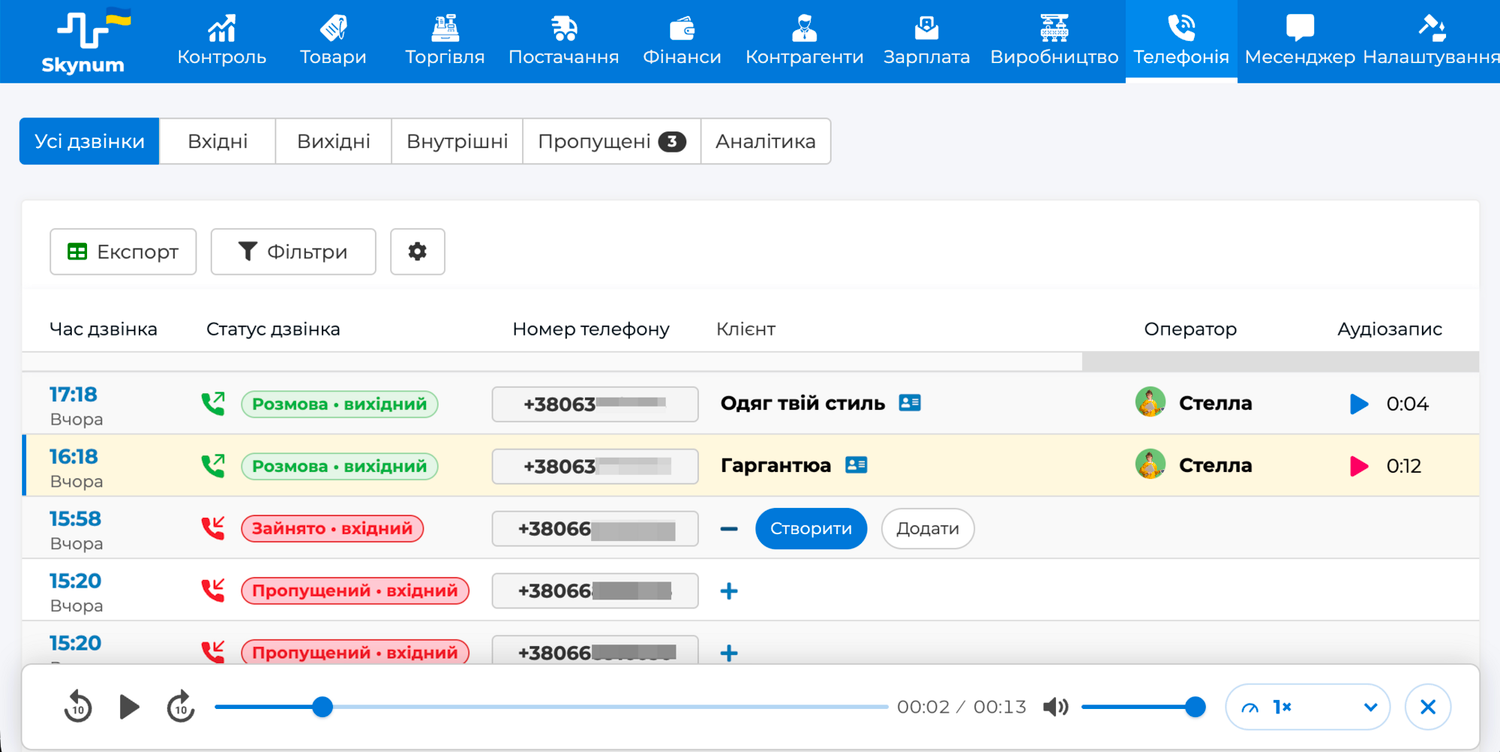
Every call — incoming, outgoing or internal — goes to the Telephony section. The log shows time, status, number, customer, operator, note and next action. The recording plays right from the row: the player opens at the bottom of the window, with rewind and speed control.
The call card gathers the details of a single call: phases and durations, operator, line, recording and source with UTM tags, if the telephony passed them.
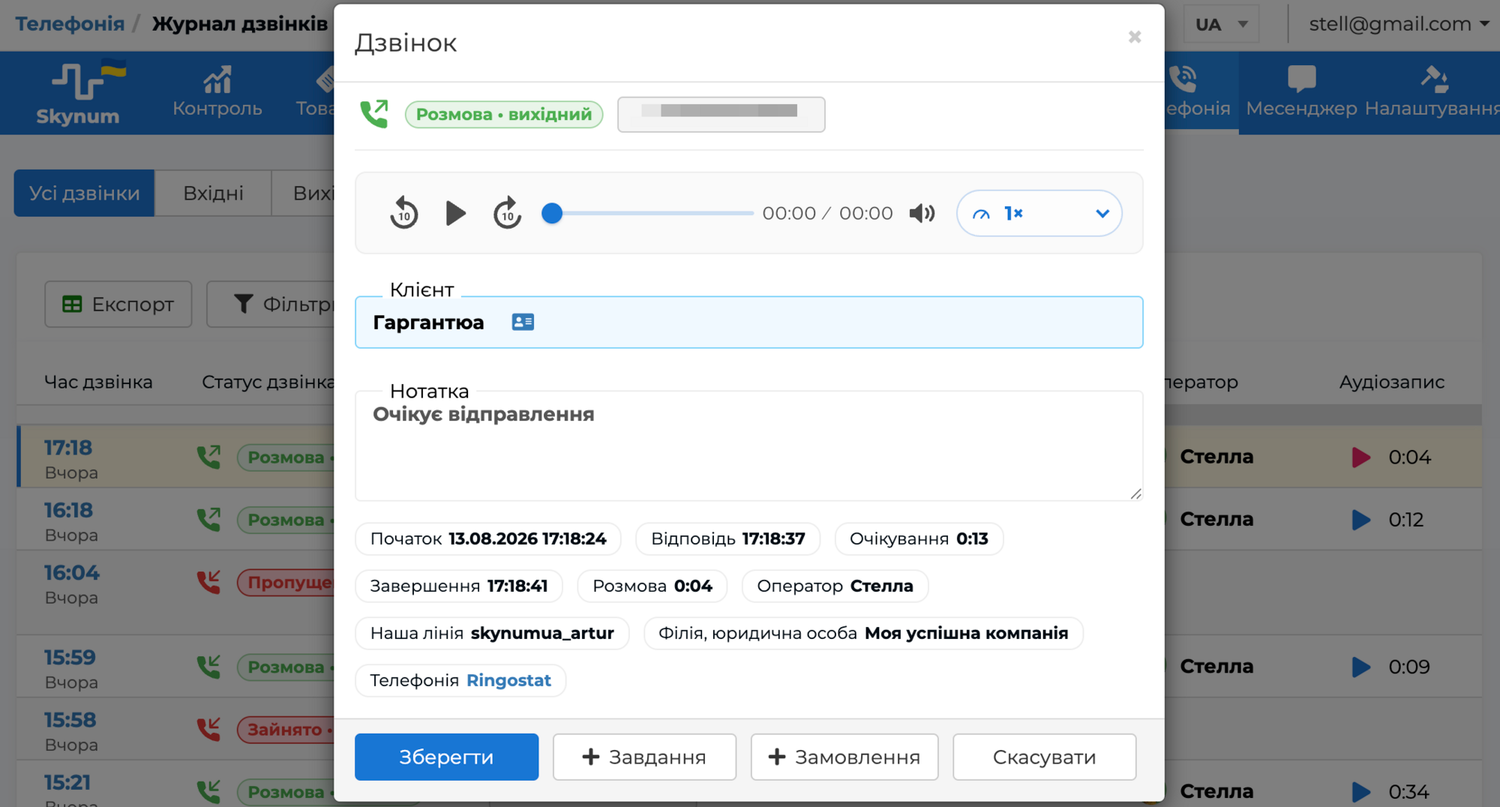
Here the manager keeps a Note — the agreements reached in the conversation — and creates the next steps from here:
- Task — an assignment linked to the call: the assignee immediately sees what the conversation was about.
- Order — a customer order with the customer already filled in.
The order keeps its link to the call, so analytics shows an honest conversion: how many conversations ended in a sale.
Missed Calls Become Tasks
A missed incoming call automatically creates a Call back task. If the customer is assigned to a responsible manager, the task goes to them; if not, it goes to the shared queue of unassigned tasks, where anyone on the team can pick it up. The due date is the same day: the sooner you call back, the higher the chance of a conversation.
Repeated calls from the same number do not create duplicates — they are attached to the task that is already open, and the manager sees all of the customer's attempts in one piece of work. The task closes by itself as soon as the conversation takes place — whether the manager got through or the customer called again.
For control, the log has a separate Missed tab: calls after which contact has not yet happened. After a successful conversation, the row disappears from it automatically.
One-Click Calling
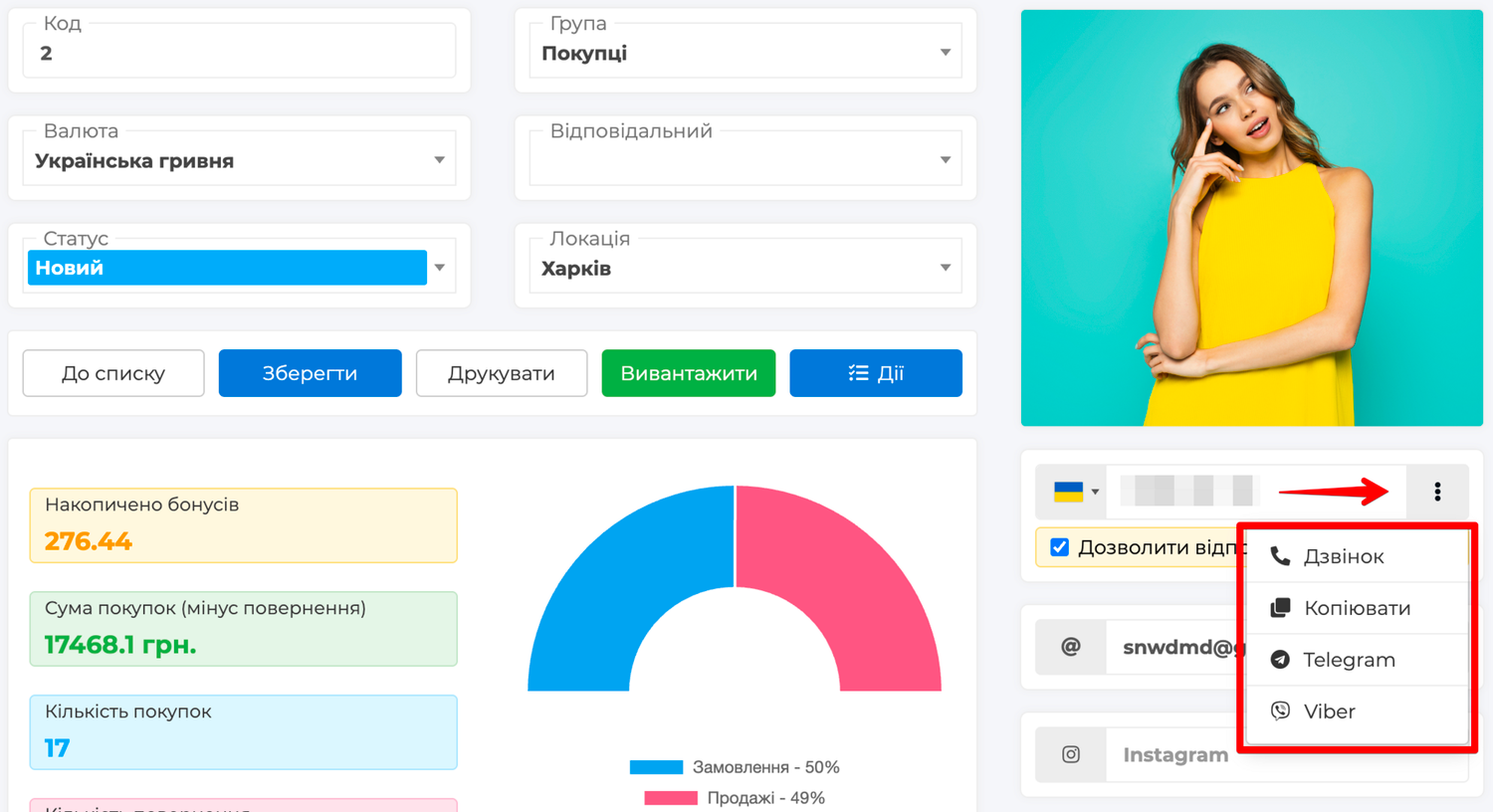
You can call a customer without dialing a number. Wherever a phone is visible in Skynum — in the counterparty card, contact person card, call log or callback task — click the number and choose Call. The same menu has the Copy, Telegram and Viber actions, so any channel of contact with the customer starts from one place.
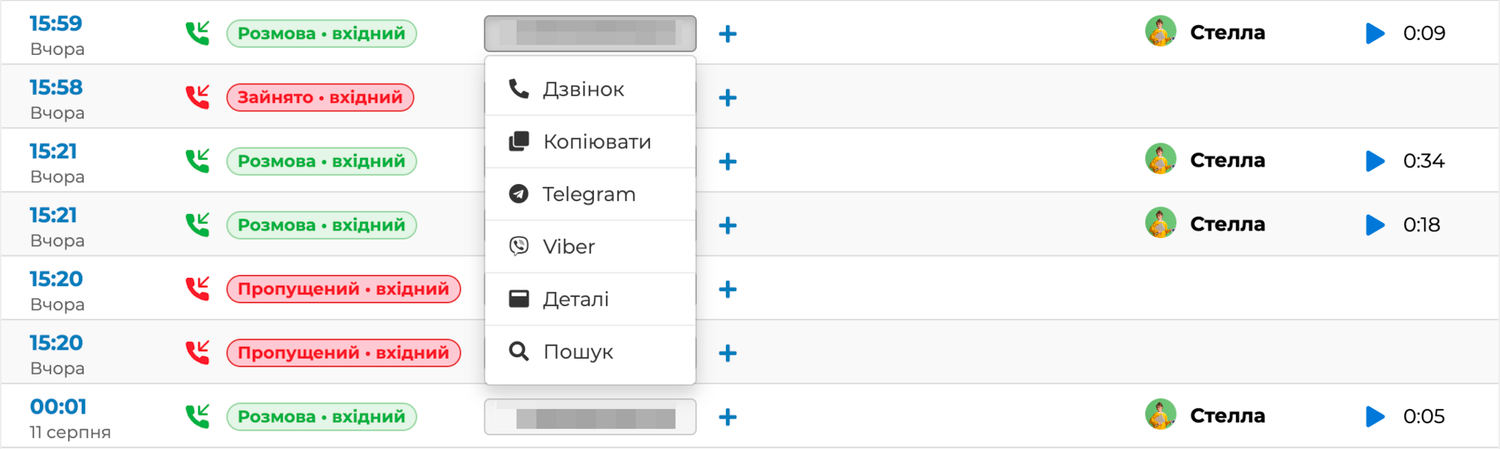
The call goes in two steps: first the manager's line rings, and once the handset is picked up, the system dials the customer. The manager does not dictate or copy the number by hand, so misdialing is ruled out, and the conversation is guaranteed to go through the company's work line — with a recording, an operator and an entry in the log as a regular outgoing call.
This is especially noticeable when working with missed calls: the manager opens the callback task and calls right from it, without looking for the number in the log. If the company has several telephony integrations connected, the call goes through the one marked Default in the integration settings.
Communication History in the Customer Card
The counterparty card has a Communications tab — a shared timeline of calls and messenger conversations with this customer and their contact persons. Events are grouped by day: calls — with the result, duration and a play button for the recording, conversations — with the last message of the day. Calls from contact persons are marked with the person's name, so it is clear who exactly you spoke to.
The feed leads to details in one click: a call opens its card with the note and recording, a conversation opens the dialog in the messenger. The All | Calls | Chats switch narrows the feed to the channel you need, and access rights are respected automatically: a user without the right to calls sees only chats.
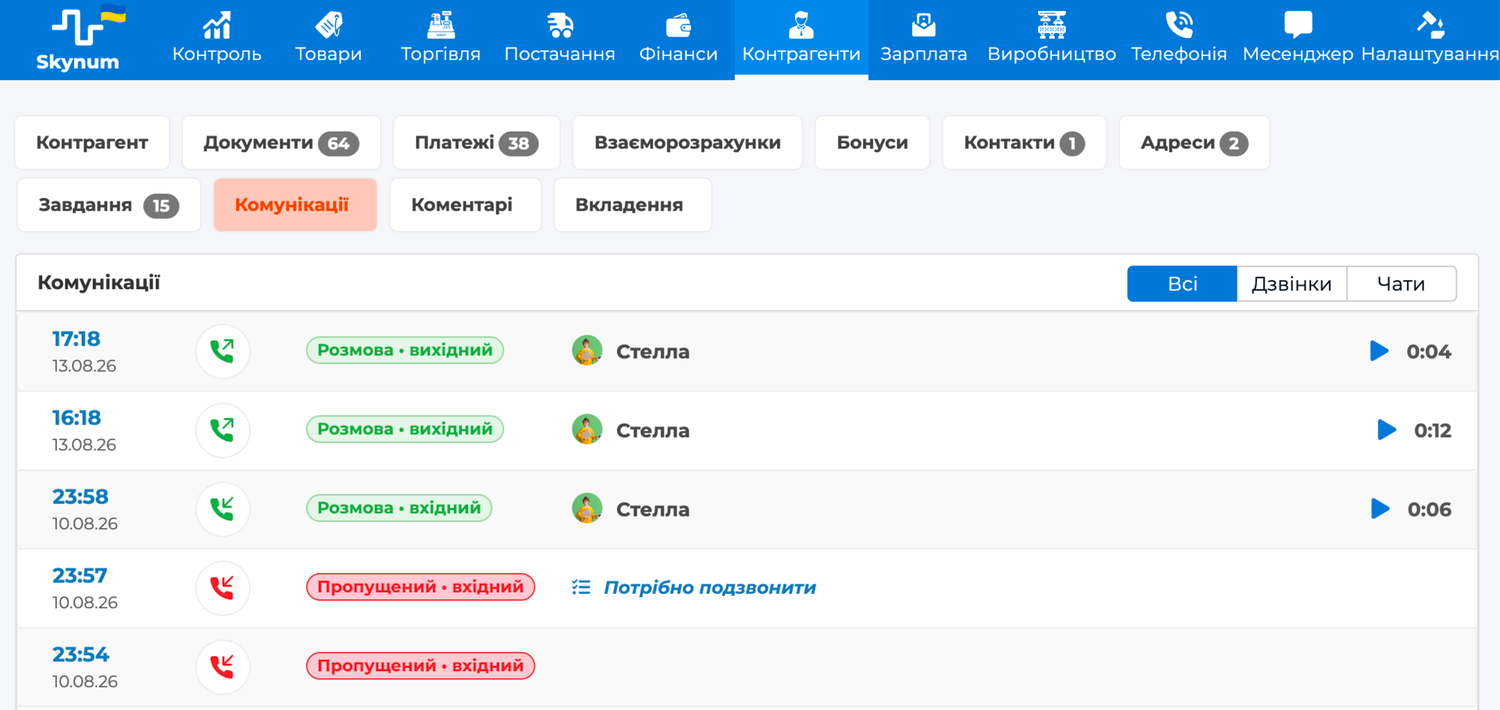
In practice, this saves time for both sides. Before a call or a reply, the manager takes a minute to recall what was discussed, what was promised and when you last spoke. And the customer does not have to retell their story to every new employee.
How It Works in Everyday Processes
Order from a Call
A regular customer calls the sales department. Smart routing connects them to the responsible manager, and the call card shows: the debt is settled, there are no open orders. The customer dictates a new delivery — the manager clicks Order right from the call and fills in the items during the conversation. The order is already linked to the customer and the call, and at the end of the month the head of department sees in analytics how many sales telephony brought in.
Missed Call After Working Hours
A buyer calls the online store at 8:40 pm, when the managers are no longer working. Skynum creates a Call back task for the responsible manager. In the morning, the manager opens the My tab in tasks, sees when the customer called and how many attempts there were — and calls in one click right from the task. The conversation took place — the task closed by itself, and the call disappeared from the Missed tab.
Load and Quality Control
The head of department opens the analytics for the month: the answer rate is 84% against a target of 90%, and the peak of calls falls on lunch hours. They shift the schedule so that more people are on the lines at lunchtime. For the manager with the longest callback task closing time, they listen to a few recordings — and find not laziness, but a typical customer question the team has no ready answer for.
Key advantage: a call in Skynum is not a separate channel but an accounting event. The customer, order, task and outcome live next to it, so phone work is as visible and manageable as sales or payments.
Call Analytics
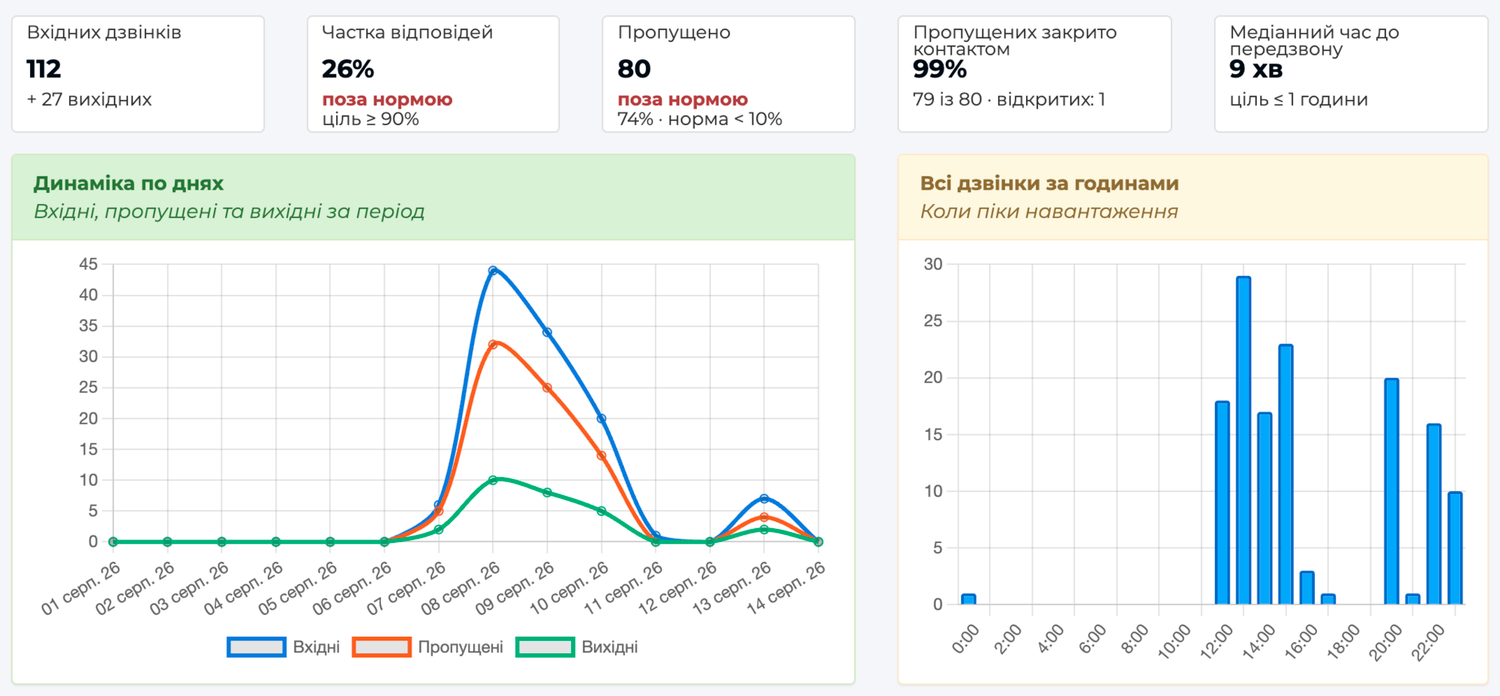
The Telephony → Analytics section answers three questions: is the company losing inquiries, when do customers call, and how does each manager perform.
- Key metrics — number of calls, answer rate with a 90% target, missed rate with a 10% norm, how many missed calls were closed by contact and the typical time to callback.
- Dynamics — charts by day of the period and by hour of the day: you can see spikes in inquiries and load peaks.
- Managers — who answered and made how many calls, average conversation duration, callback task completion.
- Conversions — how many calls became orders, broken down by UTM source or company number.
Access Rights
Access to calls is configured in user roles on the Communications tab. The company decides who sees only their own conversations and who sees all calls within their branches. Listening to recordings is a separate right: an employee can see the fact of a call but not listen to the conversation. Editing notes is likewise controlled by a separate right.
How to Connect Telephony
The integration is created in Settings → Integrations → Telephony and takes less than an hour: paste the API keys from your telephony account, match employees with their lines and make a test incoming and outgoing call. The connection is not billed separately — the company pays only its telecom operator for numbers and minutes. Then just work as usual: a week of real calls, and analytics itself will show how many inquiries the company used to handle blindly.
Integrations currently available:
Step-by-step instructions with all fields, rights and typical problems are collected in the Telephony section of the full Skynum documentation.
Five Rules of Useful Telephony
- Match all employees with lines. An unmatched line means conversations without an operator in analytics and managers without a call card.
- Fill in the Responsible field in regular customers' cards. It is what routes the call to the right manager and assigns the task for a missed call.
- Agree that only a conversation closes a missed call. A callback task is completed by contact, not by a promise.
- Record agreements in the call note. A month later it will save both the deal and your nerves.
- Review analytics weekly. Answer rate and peak hours are the fastest way to notice that the team needs help.
Telephony in Skynum turns calls into a manageable part of your records. The manager answers knowing the customer, missed calls become tasks with a due date and an assignee, conversations are stored with recordings next to orders, and the head of department sees the full picture in analytics — from line load to the conversion of calls into sales.