
In July 2026, Skynum launched collaboration in its ERP system — a new end-to-end workflow that connects tasks, comments, replies, @mentions, and real-time notifications with documents, payments, products, counterparties, and other business data.
This is not a standalone button or another internal chat. The update covers the complete lifecycle of a work-related situation: the team identifies an issue in ERP data, discusses it next to the source, involves the right colleague, assigns a responsible action, and records the result.
Skynum is evolving from a system that stores business operations into an environment where teams can also organize their work around those operations. Sales, warehouse, finance, supply, and manufacturing now share one consistent approach to collaboration.
The main idea behind the update: data provides context, comments preserve decisions, notifications direct attention, and tasks establish responsibility and record completion.
What is now available in Skynum
Collaboration consists of several connected mechanisms. Each one addresses a separate part of the process, but they deliver the greatest value when used together.
Tasks connected to ERP data
A task in Skynum defines a specific action, one assignee, a start date, a due date, a status, and completion. It can be created independently or directly from a document, payment, counterparty card, or messenger conversation.
A connected task preserves the subject of the work. The assignee does not need to search for an order, payment, or goods receipt by number and reconstruct the context — the relevant object opens directly from the task card.
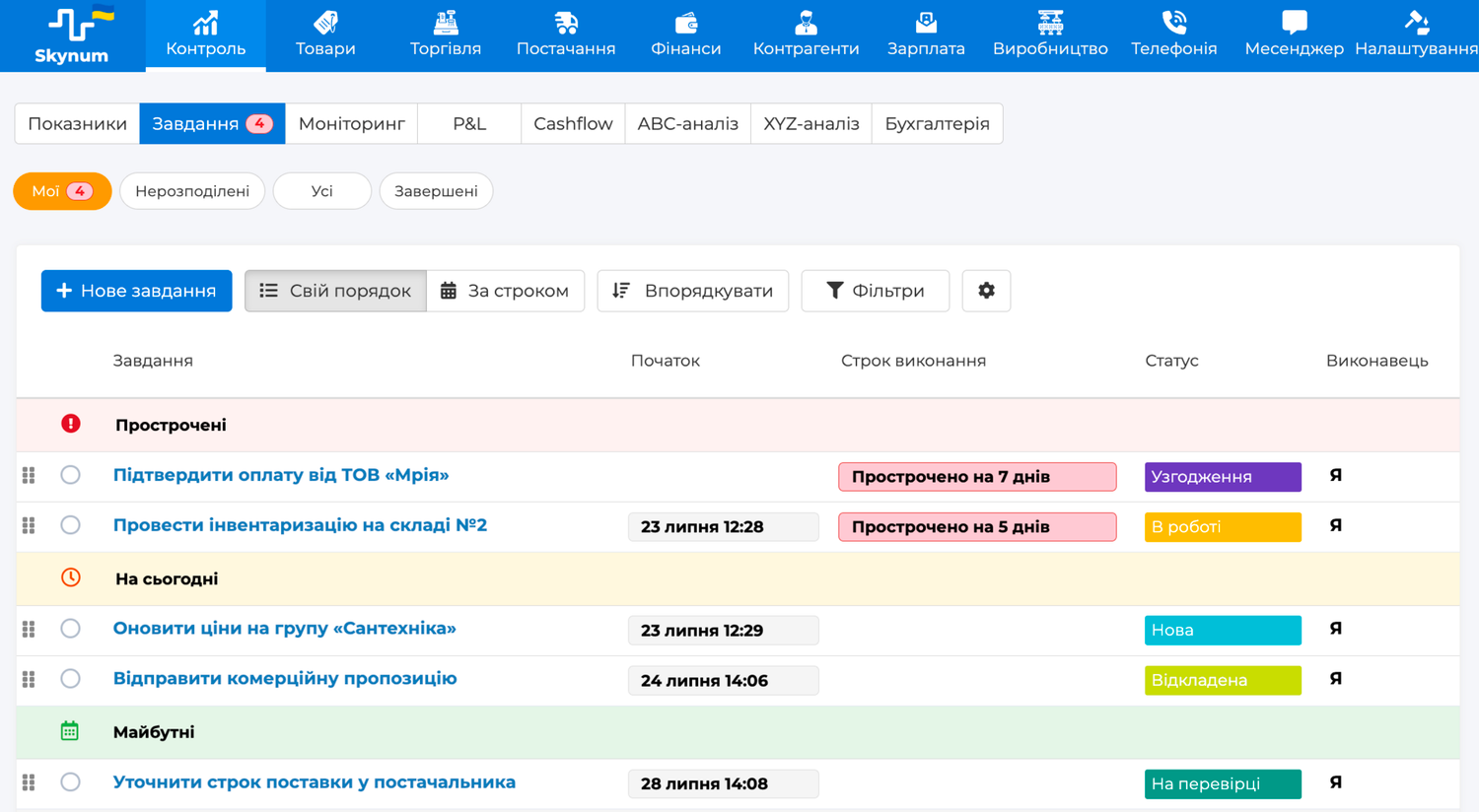
Personal, unassigned, company-wide, and completed tasks are collected under Control → Tasks. The team can work with a shared queue, filters, search, due-date sorting, and manual prioritization using drag and drop.
A complete overview is available in the article “Tasks in Skynum: from assignment to completion”.
Work discussions next to business operations
Comments are available in tasks, documents, payments, counterparty and contact person cards, products, and modifications. A discussion remains where the question originated, together with the current data and work history.
The Reply action continues a specific thread and preserves its connection to the original comment. An @mention involves an active user even if they have not previously participated in the discussion.
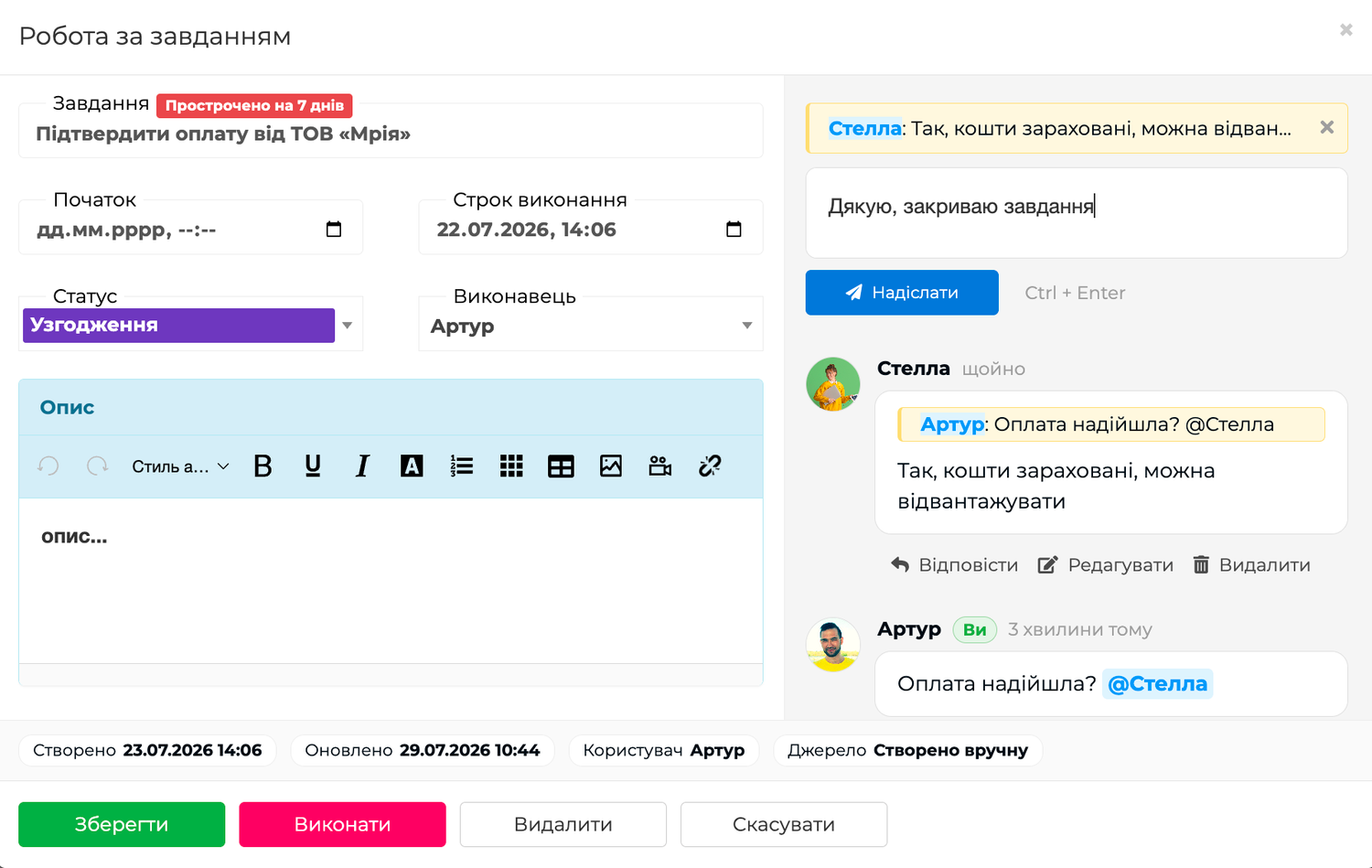
Comments preserve explanations, agreements, and verification results, but they do not replace accounting records. Amounts, quantities, counterparties, dates, and other structured data remain in the relevant ERP fields and operations.
Targeted real-time notifications
When someone replies to a user, mentions them with @, assigns them a task, or changes an important work status, there is no need to refresh the page. A short message appears on the screen, while the counter next to the bell immediately shows a new unread event.
The notification panel explains what happened, who performed the action, which work object it relates to, and when it occurred. A comment notification opens more than just the relevant document or task card — it scrolls the page directly to the specific comment.
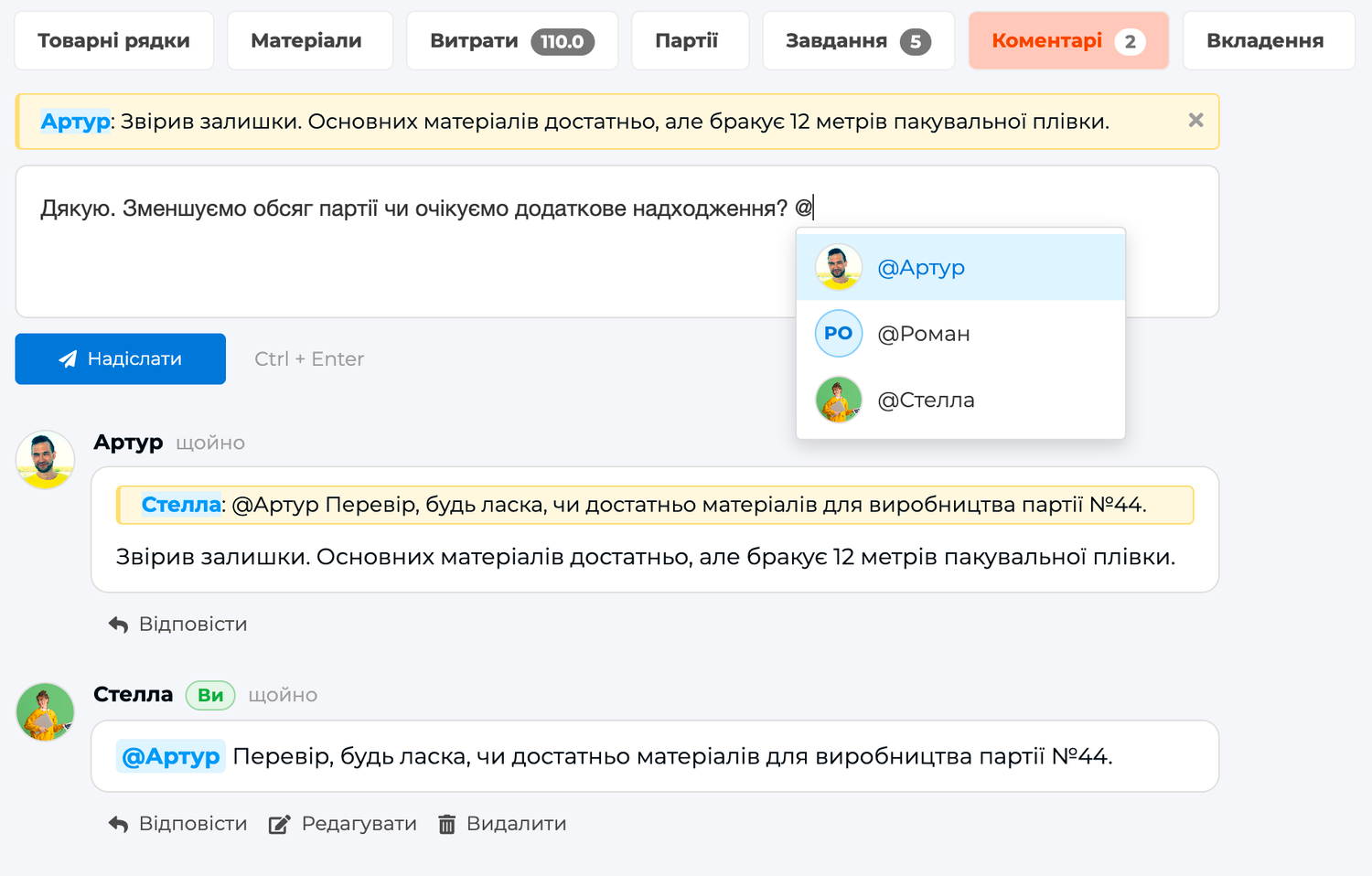
If the same person is simultaneously the recipient of a reply, an mentioned user, and a task participant, Skynum does not duplicate the event. The user receives one precise notification about the relevant comment.
From discussion to a completed result
The scale of the update is best demonstrated through a complete ERP scenario.
- A warehouse employee discovers a discrepancy in a goods receipt. The actual product quantity does not match the document.
- They describe the situation in a comment on the document. The receipt number, counterparty, and product lines are already available next to the discussion.
- The warehouse employee uses an @mention to involve the purchasing manager. The manager receives a real-time notification and goes directly to the relevant comment.
- The manager replies after checking the details with the supplier. The reply preserves its connection to the original question.
- If the products need to be recounted, a task is created from the document. The task specifies the warehouse employee, due date, and expected result.
- The assignee checks the products and completes the work. The outcome remains in the comment, the correct data is entered into the document, and completion is recorded separately.
The complete history remains in one working context: what happened, who was involved, what decision was made, who was responsible for the action, and how it was completed.
One approach for different areas of the business
Sales and finance
A manager sees an order without a confirmed payment, contacts a finance specialist in a comment, and creates a connected task for verification by the end of the day. The result remains next to the order or payment.
Warehouse and supply
Employees record discrepancies directly in a goods receipt, involve the purchasing team through @mentions, and create tasks to recount or inspect products. The document and the team’s work do not become separated across different communication channels.
Manufacturing
Before production begins, a technologist confirms material availability, receives a response from the warehouse, and assigns a task to prepare the raw materials by the planned start time. The team can see the reason behind the decision, the source production document, and the person responsible for the result.
Products and counterparties
A product card can be used to discuss a characteristic or modification, while a counterparty card preserves important context about work with a customer or supplier. The next participant sees not an isolated message, but a sequence of decisions related to a specific object.
Why this is an important stage in Skynum’s development
A traditional ERP system answers questions about what has already happened to products, documents, money, and settlements. However, a company’s daily work also consists of questions, decisions, responsible actions, and completion control.
The new update adds a complete coordination layer to Skynum’s accounting environment. It does not exist separately from the ERP system and does not require the team to transfer context manually into external services. Every discussion and task can remain connected to a real business operation.
For companies, this means:
- Less context lost between the ERP system, chats, and verbal agreements.
- Clear responsibility for every controlled action.
- Fast navigation from a notification to a specific question.
- A single history of the discussion, decision, and completion.
- A consistent approach across sales, finance, warehouse, supply, and manufacturing.
This launch demonstrates the direction of Skynum’s development: the system not only automates accounting, but also helps teams organize the work that arises around ERP data.
Collaboration and access permissions
Team collaboration features operate within Skynum’s existing access model. An @mention or notification does not grant a user access to a restricted document, payment, task, or other object if they do not have permission to view it.
Task permissions are configured separately: a user can see only their own work, tasks they created and tasks assigned to them, or all available company tasks. Creating and deleting tasks are also controlled by the user’s role.
New collaboration features at a glance
What is collaboration in Skynum?
It is the combination of work discussions, replies, @mentions, targeted notifications, and tasks with documents, payments, products, counterparties, and other ERP objects.
How is an @mention different from a task?
An @mention draws a person’s attention to a specific comment. A task establishes responsibility for an action, identifies the assignee and due date, and records completion separately.
Where is the result of the work stored?
Explanations and agreements remain in comments, the action and responsible person are recorded in the task, and the actual accounting data remains in the relevant document, payment, product, or other specialized object.
Do users need to refresh the page to receive notifications?
No. New targeted events arrive in real time while users are working, update the counter next to the bell, and remain available in the notification panel.
Collaboration is already available
The new capabilities are already available in Skynum. Start with one recurring process: payment control, goods receipt verification, document approval, or production preparation.
Learn more about the complete team workflow in “Collaboration in Skynum: from data to results”. Creating, planning, manually arranging, completing, and configuring tasks are covered in “Tasks in Skynum: from assignment to completion”.