
A fiscal chain is needed when one sale is paid not by one settlement operation, but by several: a prepayment, partial payments, payment in a sales delivery note, a payment after shipment, or a final settlement after the goods are received.
In a simple sale, the buyer immediately pays the full amount, and Skynum creates one fiscal receipt. In a complex sale, the buyer may pay part of the amount now and part later, while the shipment can be processed as a separate sales delivery note. In this case, Skynum links all fiscal receipts of one sale into one fiscal chain.
In this scenario, a complex sale does not split into isolated receipts. Skynum manages it as one controlled fiscal history: it sees already fiscalized prepayments, determines the final settlement, shows the entire chain in the interface and returns it as a complete operation.
Important: for complex fiscal chains in Skynum, use a fiscal service that supports such scenarios. At the moment, use Checkbox for prepayments, final settlements and returning the entire chain. Vchasno.Kasa in Skynum is used for simple single receipts.
One fiscal history for a complex sale
Standard fiscalization works well when there is one payment and one receipt. In a real ERP sale, the scenario is often more complex: the buyer makes a prepayment, then pays another part, the goods are shipped with a delivery note, the remaining amount is closed by the final settlement, and sometimes the sale needs to be returned in full.
The fiscal chain in Skynum solves this complex scenario. The system does not force the user to manually collect receipts into a sales history, calculate balances or determine which payment is final.
- All related fiscal receipts remain in one sale.
- Skynum automatically determines where the prepayment is and where the final settlement is.
- The user sees the complete fiscal chain of documents and payments.
- A complex sale return is started as a return of the entire chain.
- The same principle works for manual work, online orders and Nova Poshta cash on delivery.
How prepayments and final settlement work
A prepayment is a fiscalized payment that does not yet close the full sale amount. There can be one or several prepayments.
A final settlement is a fiscalized operation after which there is no unpaid amount left in the sale. The final settlement is what closes the fiscal chain.
For example, a sale for UAH 10,000 can go as follows:
- the buyer makes a prepayment of UAH 3,000;
- later the buyer makes another prepayment of UAH 2,000;
- the remaining UAH 5,000 is fiscalized as the final settlement;
- after that, the fiscal chain is closed.
The user does not manually choose what is a prepayment and what is a final settlement. Skynum determines this automatically based on the amount of already fiscalized payments and the full sale amount.
Where a fiscal chain can appear
In Skynum, a fiscal chain can appear in several working scenarios:
- the buyer makes a prepayment for an order;
- several related payments are added to the order;
- a prepayment is added to a sales delivery note;
- a sales delivery note is fiscalized with partial payment, and the remaining amount is issued as credit;
- a sales delivery note is issued fully on credit, and the buyer later pays with one or several payments;
- Nova Poshta cash on delivery creates a payment after the buyer receives the parcel;
- an online store sends a paid order, and Skynum creates and fiscalizes a related payment.
In all these scenarios, a specific document or payment is fiscalized. The order, sales delivery note and payments give Skynum the sale context, amount, products, taxes and payment method.
A customer order is not fiscalized directly. Payment fields inside the order itself do not create a fiscal receipt. If you need to fiscalize payment for an order, create a related payment and fiscalize that payment. A sales delivery note, unlike an order, can be fiscalized as a document.
What to configure before working with chains
Before launching complex scenarios, check the basic fiscalization settings.
- The Checkbox fiscal integration is connected.
- Tax groups and payment methods are filled in the fiscal integration on the API mapping tab.
- The correct PRRO is selected in documents and payments.
- Documents and payments are created in hryvnia.
- The document or payment date matches the fiscalization day.
- The sale total has no rounding, because a fiscal chain requires exact amount matching.
- The chain has no unfinished or failed fiscalization.
If fiscalization in one sale has already started through one fiscal service, continue this sale through the same service. Different fiscal services cannot be mixed in one fiscal chain.
Prepayment in an order
A prepayment for an order is processed through a related payment. This is the correct scenario when the buyer first pays part or all of the order amount, and the sales delivery note will be created later.
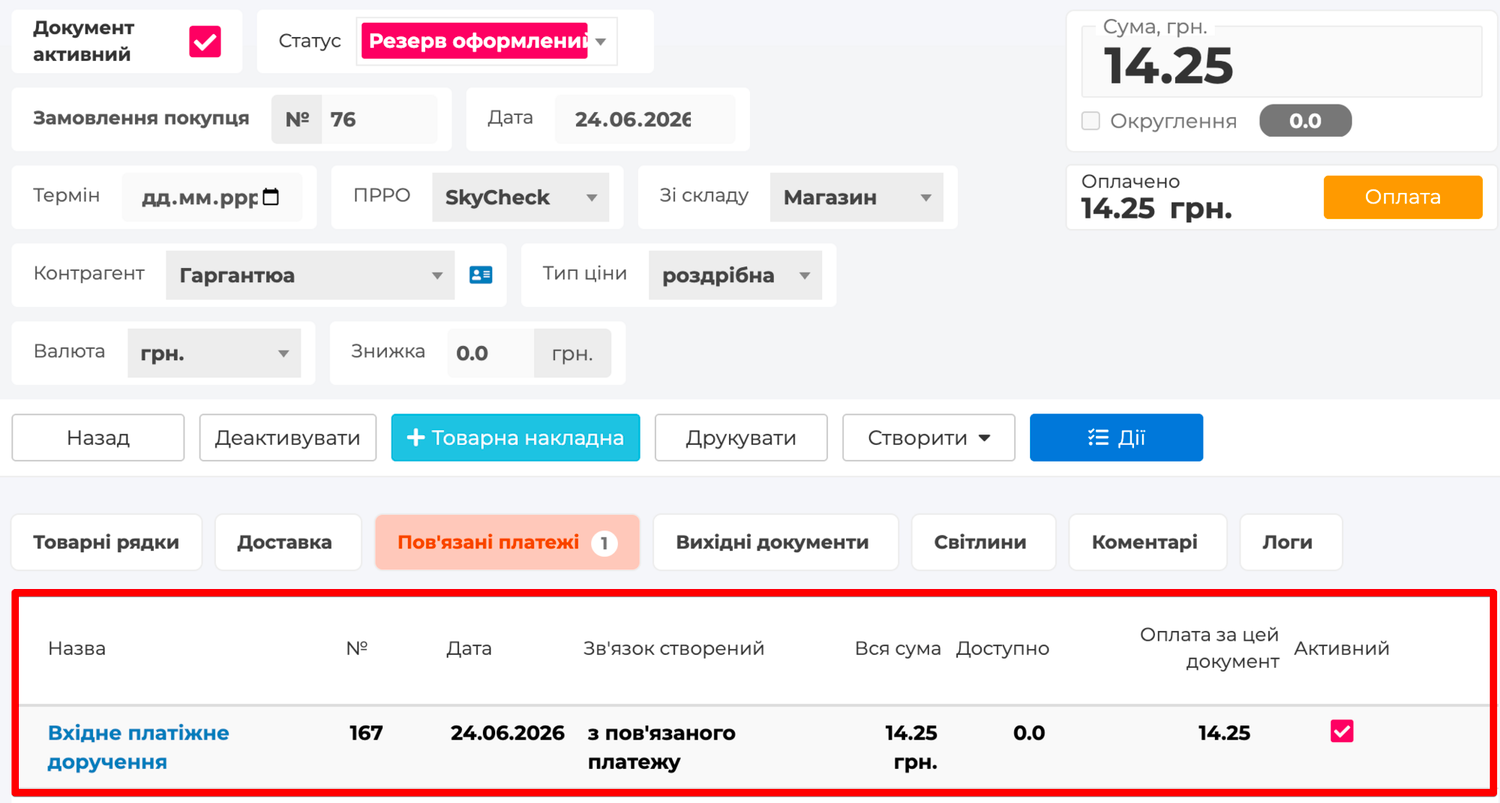
- Create a Customer order with products.
- Create a related incoming payment for this order.
- Activate the payment.
- Open the payment and click Fiscalize.
If the order is for UAH 10,000 and the payment is for UAH 3,000, Skynum fiscalizes this payment as a prepayment. If another payment for UAH 2,000 is added later, it will also be part of the same fiscal chain. The remaining UAH 5,000 will be closed by the final settlement.
When a sales delivery note is created from such an order, it must match the order by products and amount. Skynum uses the order as the basis of the fiscal chain, so the sales delivery note must not change the fiscal content of the sale.
If several sales delivery notes are planned from one order, do not fiscalize the payment in the order through a related payment. In this scenario, the order works as an aggregator, and each sales delivery note is fiscalized separately as an independent sale.
Full payment in an order
If the buyer immediately pays the full order amount, this must also be a related payment.
For example, an order for UAH 10,000 has one related payment for UAH 10,000. After this payment is fiscalized, the sale is already fully fiscalized. A sales delivery note can be created later for shipment accounting, but the fiscal settlement has already been completed through the payment.
In this scenario, the sales delivery note does not need to be additionally fiscalized for the same amount. That would create duplicate fiscalization of one sale.
Payment in a sales delivery note
A payment can be related not only to an order, but also to a sales delivery note. Such a payment can be a prepayment or a final settlement depending on the sale amount and already fiscalized payments.
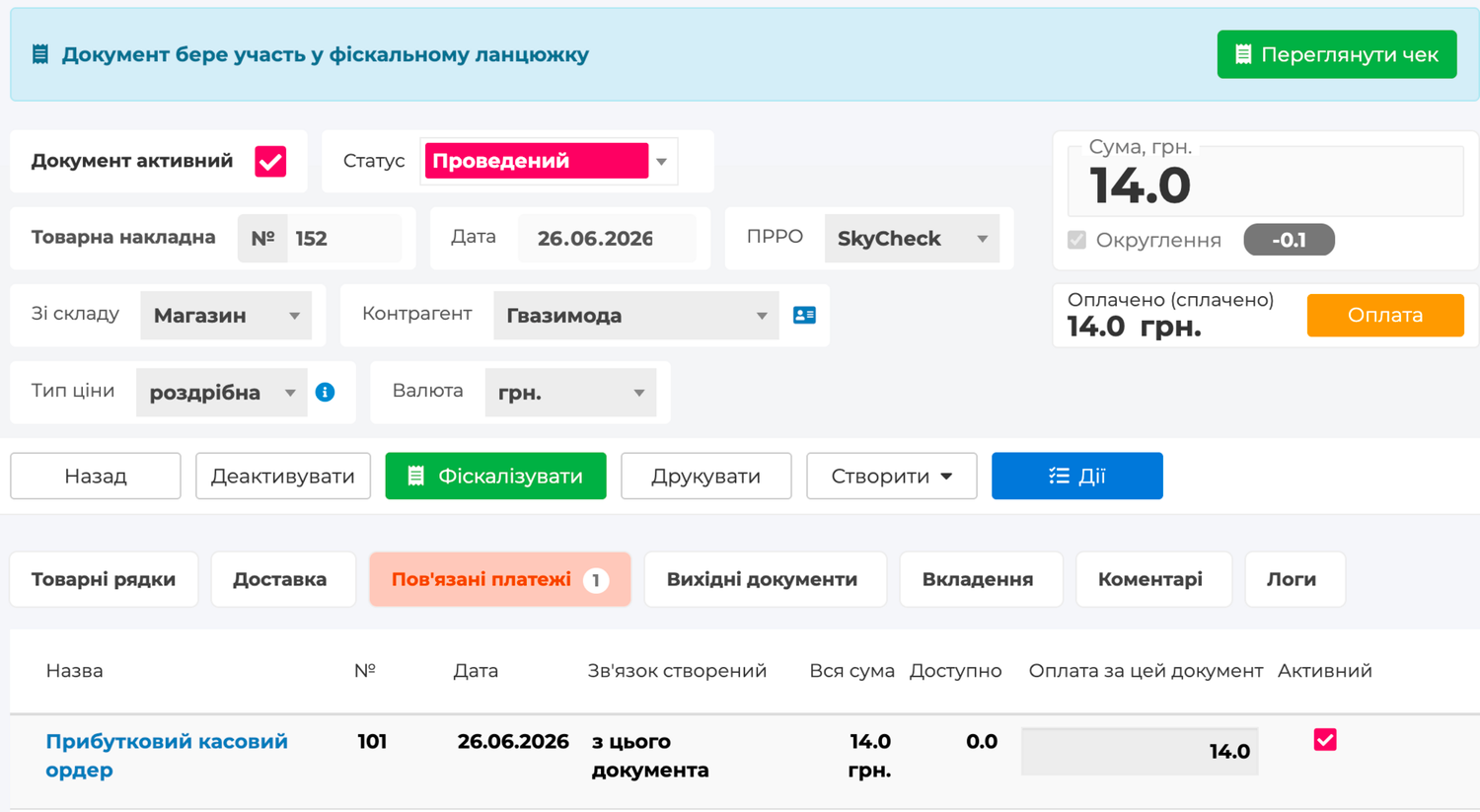
For example, a sales delivery note for UAH 8,000 has a related payment for UAH 2,000. After fiscalization, this payment will be a prepayment. If a payment for UAH 6,000 is created later, it will become the final settlement and close the fiscal chain.
If a payment for the full amount of UAH 8,000 is immediately linked to the sales delivery note, fiscalizing this payment will create the full fiscal settlement for the sale.
Fiscalizing the sales delivery note itself
A sales delivery note can be fiscalized as a document if payment is specified directly in the delivery note.
The sales delivery note can contain payment fields:
- Cash payment;
- Cashless payment;
- Bonus payment, if the company uses bonuses.
If the delivery note is for UAH 10,000 and full payment of UAH 10,000 is specified in it, fiscalizing the delivery note creates a full sales receipt.
If the delivery note is for UAH 10,000, payment of UAH 3,000 is specified in it, and the remaining UAH 7,000 is issued as credit, fiscalizing the delivery note creates a prepayment receipt for UAH 3,000. The next related payment for UAH 7,000 will become the final settlement.
If the sales delivery note is issued fully on credit and has no payment amount, the delivery note itself does not need to be fiscalized. When the buyer makes a payment, create a related payment for the delivery note and fiscalize that payment.
Final settlement
The final settlement closes the fiscal chain. It can be a payment in an order, a payment in a sales delivery note, or fiscalization of the sales delivery note itself with payment for the remaining amount.
Skynum determines the final settlement automatically: if after the current fiscalization the sum of all fiscalized payments equals the full sale amount, the chain is closed.
Example:
- Sale — UAH 15,000.
- First prepayment — UAH 5,000.
- Second prepayment — UAH 4,000.
- Remaining amount — UAH 6,000.
- The payment for UAH 6,000 is fiscalized as the final settlement.
After the final settlement, additional fiscal payments in this chain are not available. If the sale needs to be canceled, use the return of the entire fiscal chain.
How to view a fiscal chain
If a document or payment participates in a fiscal chain, Skynum shows a panel with a message about the chain. The View chain button is available in this panel.
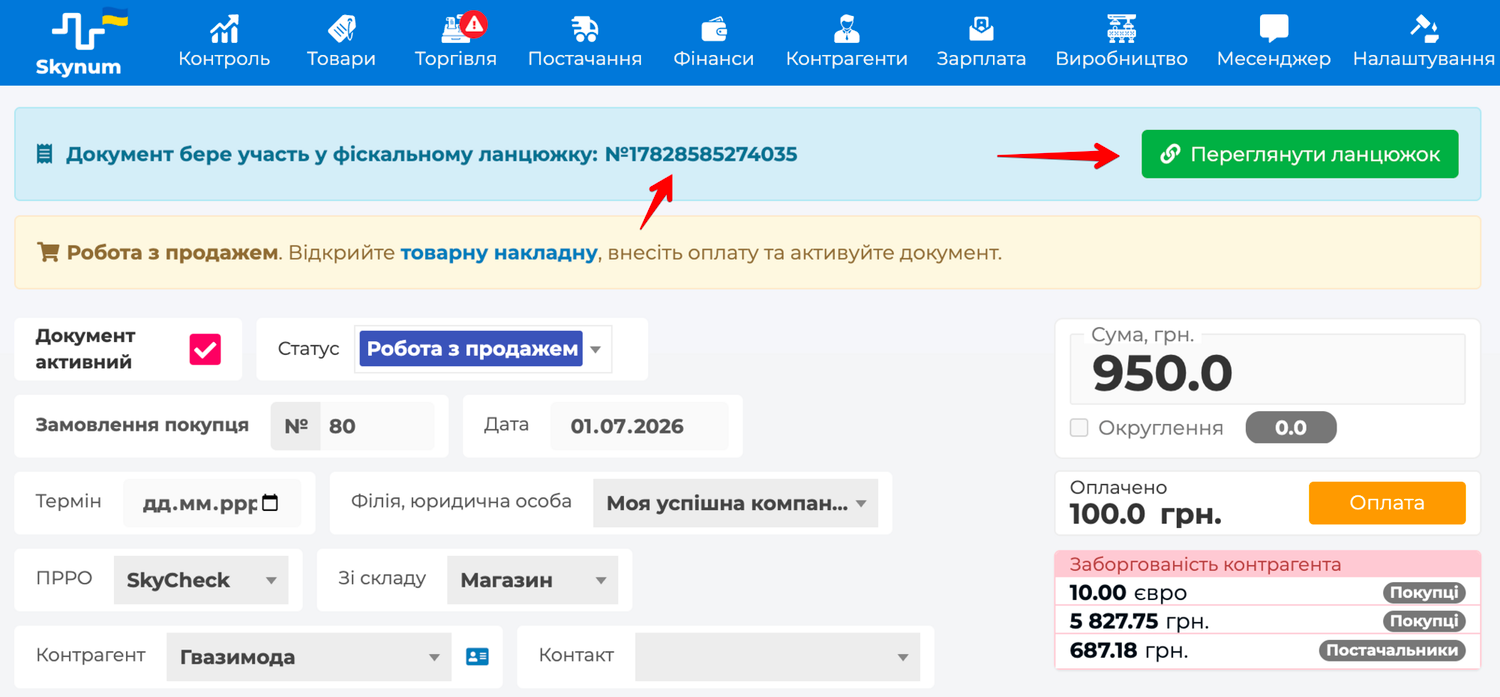
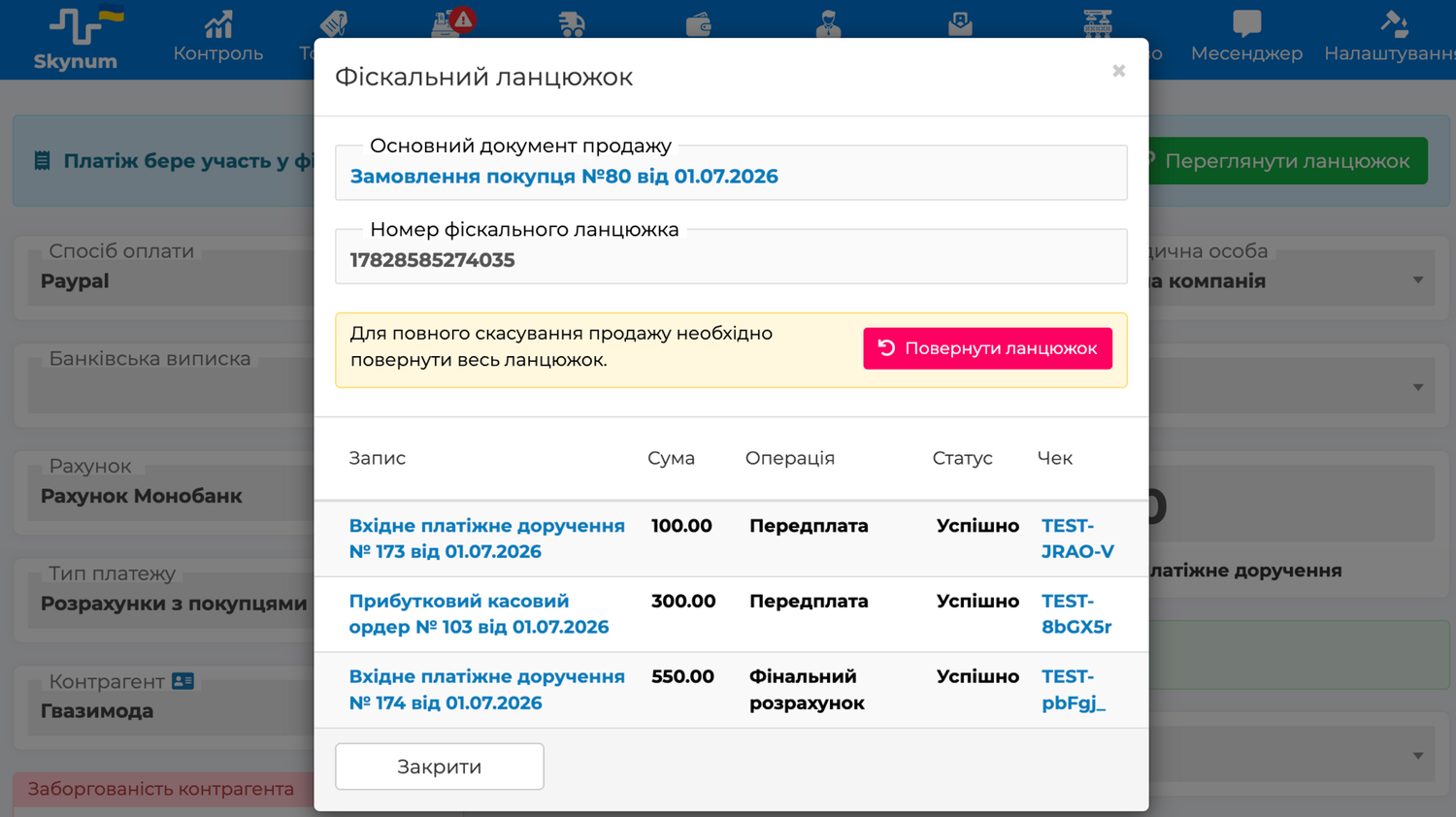
After clicking it, the Fiscal chain window opens. It shows:
- Main sales document;
- Fiscal chain number, if the fiscal service has already returned the link number;
- documents and payments included in the chain;
- the amount of each fiscal operation;
- operation type: Prepayment, Final settlement or Return;
- fiscalization status;
- a link to the fiscal receipt.
Returning a fiscal chain
If a sale had several fiscal payments, it must be returned as one related fiscal chain. You do not need to manually return each receipt, each payment or each part separately.
- Open a document or payment that is included in the fiscal chain.
- Click View chain.
- Check documents, payments, amounts and receipts in the Fiscal chain window.
- Click Return chain.
- Wait until the return is completed.
During the return, Skynum automatically creates the required return documents and payments, and then fiscalizes the return through the fiscal service. The user starts the return from one place, while the system keeps the link between all parts of the sale.
After the return is started, the entire fiscal chain is blocked for further fiscally significant work. This is required for a consistent fiscal history: after the return, new fiscal payments cannot be added, and parts of the sale that have already become part of the fiscal chain cannot be changed manually.
The return of a complex fiscal chain is performed in full. If a sale with prepayments or several fiscal payments needs to be returned, the entire chain is returned.
Rules of a correct fiscal chain
A fiscal chain works with several documents, payments, receipts and returns. That is why it needs rules that keep a clear link between the sale, payment and fiscal receipt.
- Payment fields of the customer order itself are not fiscalized. The order is the basis of the sale, and the settlement operation must be a separate related payment. This preserves the exact link between the payment and the fiscal receipt.
- Several sales delivery notes cannot continue one order in which a prepayment has already been fiscalized. After payment fiscalization, the order becomes one fiscal sale. If several sales delivery notes need to be created from one order, do not fiscalize the payment in the order; fiscalize each sales delivery note separately.
- Different fiscal services are not mixed in one chain. Each service has its own rules for receipts, returns and fiscalization codes, so the entire chain must go through one service.
- A payment without a related order or sales delivery note is not included in a fiscal chain. Skynum needs the main sales document to determine the full amount, remaining amount and final settlement moment.
- The sale total must have no rounding. In a sale with several fiscal operations, every kopeck must match the sale amount; otherwise, the final settlement will not be mathematically exact.
- A complex chain return is performed in full. If the sale consisted of several related receipts, the return must preserve the complete history of all settlements, so the entire chain is returned.
Automatic scenarios
A fiscal chain can appear not only manually, but also in automatic scenarios.
Online order
If an online store sends a paid order, Skynum can automatically create a related payment for the order and fiscalize this payment. If the payment is partial, it will be a prepayment. If the payment closes the full order amount, it will be the final settlement.
More details: automatic fiscalization of online orders.
Nova Poshta cash on delivery
Nova Poshta cash on delivery works as an automatic payment after the parcel receipt and payment are confirmed. If the sale already had a prepayment, the cash-on-delivery payment can become the final settlement. If there was no prepayment, cash on delivery can be the only fiscal payment of the sale.
More details: Nova Poshta cash on delivery.
Quick check before fiscalization
- The sale has the correct PRRO.
- The fiscal service supports fiscal chains.
- The document or payment is activated.
- The document or payment date is the current date.
- The currency is hryvnia.
- Tax groups and payment methods are mapped in the integration.
- The amount of the current fiscalization is not greater than the remaining sale amount.
- The chain has no unfinished fiscalization or return.
- If the order has a fiscalized prepayment, several fiscalized sales delivery notes are not created from it.
Summary
A fiscal chain allows you to work with a complex sale as controllably as with a simple receipt: accept several payments, ship goods, close the final settlement and return the sale without manually assembling the fiscal history. Skynum handles the chain logic, while the user works with familiar documents and payments.
This is the main value of a fiscal chain: a complex sale remains a complete ERP process, not a set of receipts that must be manually reconciled with each other. This approach is especially important for businesses with partial payments, credit sales delivery notes, online orders and cash on delivery. For such scenarios, use Checkbox, one fiscal service within the sale and returns through View chain.