Nova Poshta cash on delivery is needed when the buyer pays for goods while receiving the parcel, and the company wants to automatically record this payment in Skynum, create a fiscal receipt and send it to the buyer.
In this scenario, Nova Poshta confirms that the parcel has been received and payment control has been completed. After that, Skynum creates an incoming payment for the remaining amount due, and when Payment fiscalization is enabled, automatically fiscalizes this payment through the connected fiscal service.
Important: in Nova Poshta cash on delivery, the delivery, the delivery service and the express waybill are not fiscalized. The buyer's incoming payment created by Skynum after Nova Poshta confirms the payment is fiscalized.
How cash on delivery works in Skynum
Cash on delivery connects logistics, payment and fiscalization into one controlled process. The manager does not need to manually wait for the parcel status, create a payment and separately start the receipt if automation is configured in advance.
- Nova Poshta delivery is created in the sales document or order.
- Payment control is enabled in the delivery.
- Skynum sends Nova Poshta the amount that must be received from the buyer when the parcel is issued.
- The buyer receives the parcel and pays for the goods through Nova Poshta or NovaPay.
- Nova Poshta confirms parcel receipt and payment through tracking.
- Skynum creates an incoming payment for the unpaid remaining amount of the document or order.
- If Payment fiscalization is enabled, Skynum fiscalizes the created payment.
- After successful fiscalization, Skynum sends the fiscal receipt to the buyer if the fiscal service settings allow it.
This approach is important for sales with prepayment, a credit sales delivery note or payment on receipt. Skynum does not create a conditional receipt for delivery, but records the actual settlement operation: the buyer's payment.
What to configure before launch
Before working with cash on delivery, check that the company has already prepared the basic delivery, payment and fiscalization settings.
- The Nova Poshta integration is connected in Settings → Integrations → Delivery services.
- The Nova Poshta integration is active and has the correct branch or legal entity.
- The sender address is configured in Nova Poshta, and express waybill creation is available.
- A payment method for cash-on-delivery funds is created in Skynum, for example NovaPay.
- A bank account or a separate account for NovaPay funds is selected in the payment method.
- A fiscal service that supports the required sales scenario is connected for automatic fiscalization.
- Tax groups and payment methods are filled in the fiscal integration.
- The correct PRRO is selected in the document if the receipt must be created automatically.
More about connecting Nova Poshta delivery is available in the corresponding Skynum help article.
More about the fiscal service for complex scenarios: Checkbox integration.
Settings in the Nova Poshta integration
Typical cash-on-delivery settings are defined in the Nova Poshta integration card. They are inserted into the document delivery, but before creating the express waybill they can be changed for a specific shipment.
Open Settings → Integrations → Delivery services, select the Nova Poshta integration and check the fields in the settlement settings block.
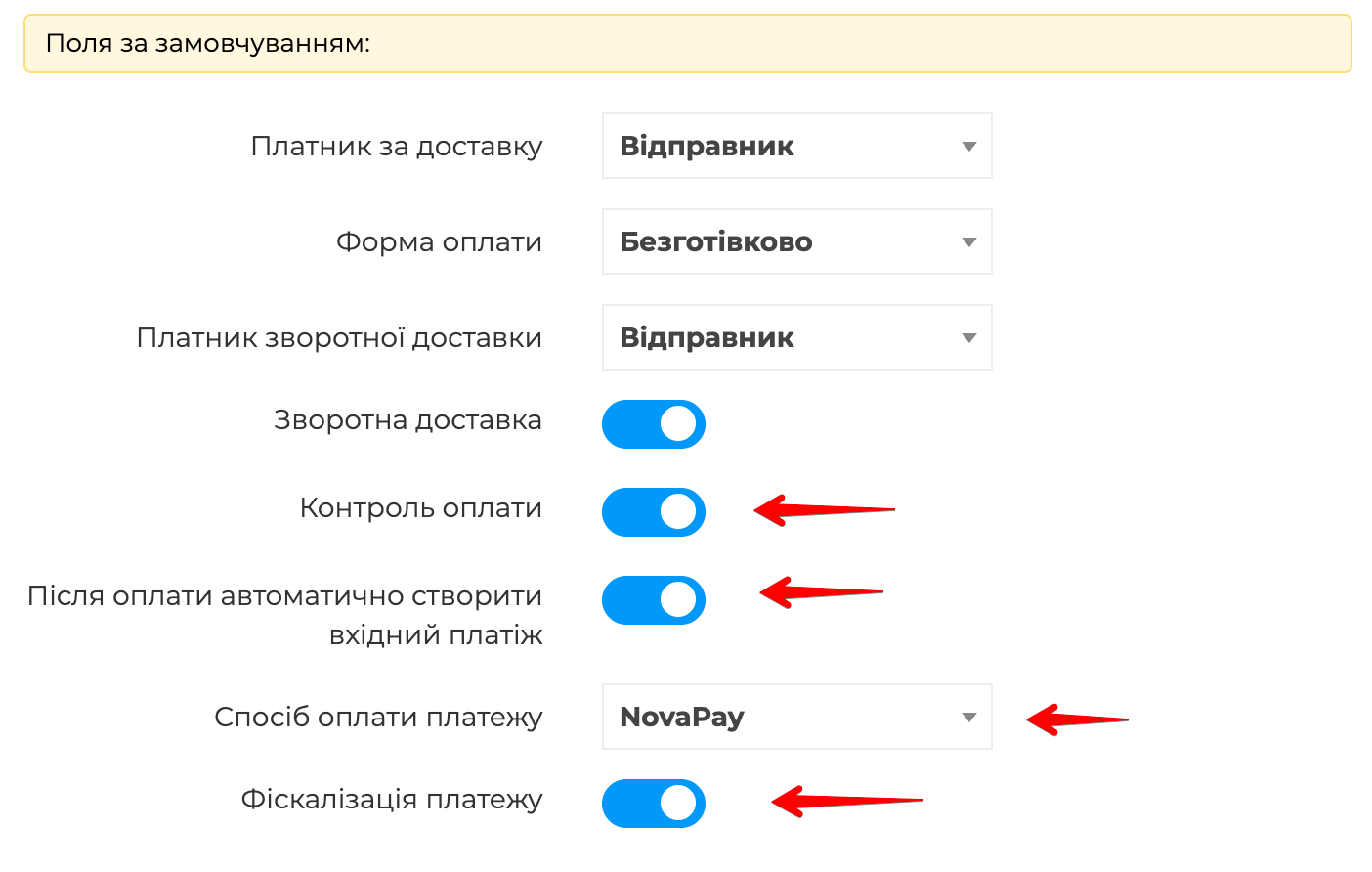
- Payment control — enables the amount that Nova Poshta must receive from the buyer when the parcel is issued.
- After payment, automatically create an incoming payment — allows Skynum to create an incoming payment after Nova Poshta confirms parcel receipt and payment.
- Payment method for the payment — defines the payment method, bank account and financial channel through which the cash-on-delivery payment will be created. It is convenient to use a separate payment method for this, for example NovaPay.
- Payment fiscalization — starts automatic fiscalization of the created payment. If the field is disabled, Skynum will create the payment, but the fiscal receipt will need to be created separately.
The cash-on-delivery payment method must be cashless. A cash payment method is not suitable for automatic Nova Poshta cash on delivery, because Skynum creates an incoming payment through the financial account that corresponds to the receipt of funds from NovaPay or another cashless channel.
Settings in document delivery
In the document, cash on delivery is configured on the Delivery tab. For Nova Poshta, the Settlement block contains payment control, automatic payment and fiscalization fields.
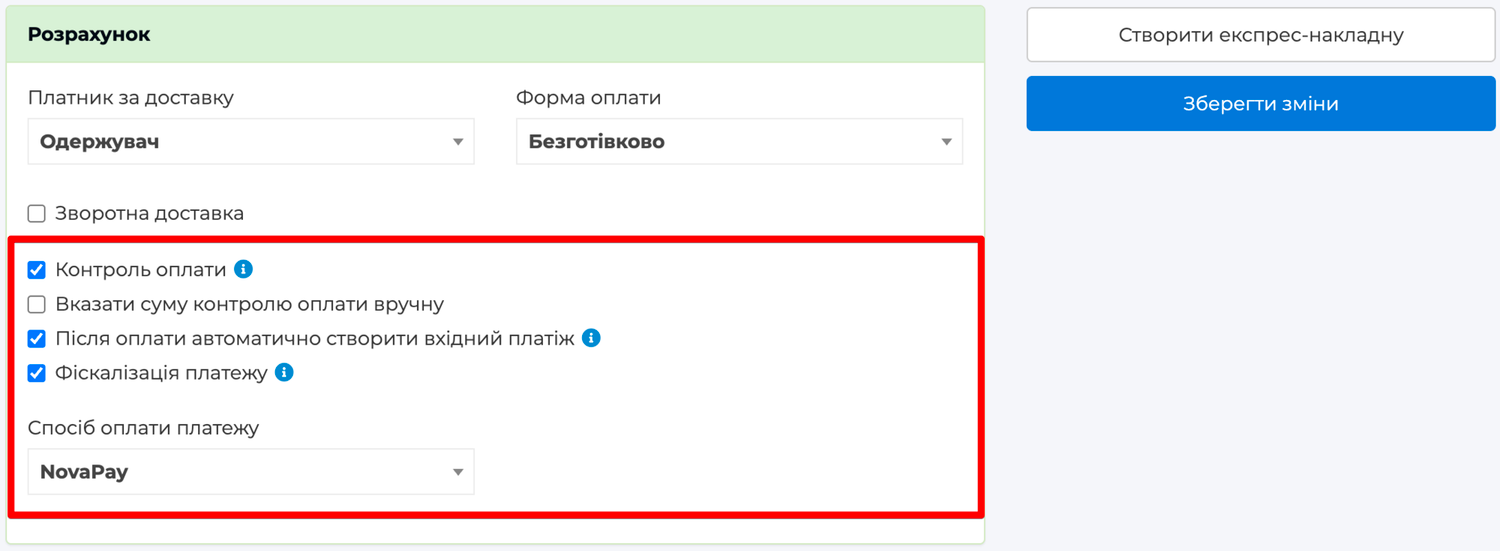
- Payment control — the amount that Nova Poshta must receive from the buyer when the parcel is issued.
- Specify payment control amount manually — opens a field for manual entry of the payment control amount.
- After payment, automatically create an incoming payment — enables payment creation after Nova Poshta confirms payment.
- Payment fiscalization — enables automatic fiscalization of the created payment.
- Payment method for the payment — the payment method through which the incoming payment will be created.
By default, the payment control amount does not need to be entered manually. Before creating the express waybill, Skynum takes the current remaining amount due for the document or order and sends this amount to Nova Poshta.
If the sale already had a prepayment, only the remaining amount is included in payment control. For example, if a sales delivery note for UAH 12,000 has a prepayment of UAH 4,000, Nova Poshta payment control will be UAH 8,000.
A manual amount should be entered only when the company deliberately sends a different payment control amount to Nova Poshta. In this case, the user is responsible for the correctness of the amount.
After the express waybill is created, payment-on-receipt settings no longer change. If you need to change the payment control amount, automatic payment or fiscalization, check whether the express waybill needs to be deleted and recreated with the correct terms.
Which documents support automatic cash on delivery
Automatic cash on delivery works when Skynum can clearly determine the document, the remaining amount due and the future buyer payment.
Active sales delivery note
The main scenario is an active Sale sales delivery note that has an unpaid amount. If the sales delivery note is issued on credit or partially paid, after Nova Poshta confirmation Skynum creates an incoming payment specifically for this delivery note.
Example:
- Sales delivery note — UAH 15,000.
- Prepayment — UAH 5,000.
- Remaining amount due — UAH 10,000.
- Payment control is enabled in the delivery.
- Skynum sends Nova Poshta payment control of UAH 10,000.
- After parcel receipt and payment, Skynum creates a payment for UAH 10,000.
- If Payment fiscalization is enabled, this payment becomes the final settlement in the fiscal chain.
Active customer order without a created sales delivery note
Cash on delivery can also work for an active Customer order if no sales delivery note or retail sale has been created from it yet. In this case, Skynum creates a payment for the order.
If a sales delivery note has already been created from the order, cash on delivery must be managed through the sales delivery note. This preserves the correct link between shipment, payment and fiscal receipt.
A customer order is not fiscalized directly. If cash on delivery creates a receipt for an order, the related payment is fiscalized. More about fiscal chains: prepayments, final settlement and fiscalization.
When Skynum creates a payment
Skynum creates a payment only after Nova Poshta confirms the payment. The fact that the parcel was received is not enough: a regular parcel without cash on delivery can also be received.
For the payment to be created, the following conditions must be met:
- delivery has Payment control enabled;
- After payment, automatically create an incoming payment is enabled;
- Payment method for the payment is selected in the delivery;
- Nova Poshta confirmed that the parcel was received;
- Nova Poshta confirmed payment for the express waybill;
- the payment control amount from Nova Poshta tracking matches the remaining amount due in Skynum;
- the document or order is activated and has an unpaid amount.
If the Nova Poshta amount does not match the remaining amount due in Skynum, the automatic payment is not created. This protects accounting from a situation where the buyer paid one amount while the ERP has another financial state.
How automatic fiscalization works
If Payment fiscalization is enabled in the delivery, Skynum starts fiscalization of this payment immediately after creating the incoming payment.
The fiscal service is taken from the document and the PRRO field. If cash on delivery is part of a sale with a prepayment or several fiscal payments, use a fiscal service that supports fiscal chains. For fiscal chains in Skynum, Checkbox is used. If cash on delivery creates one fiscal receipt for the payment, a service that supports simple payment fiscalization is enough.
If fiscalization could not be completed due to a temporary technical issue, Skynum performs limited retries of the same fiscalization. Retries do not create a new payment and do not duplicate the fiscal operation.
If automatic fiscalization did not start because of settings, for example the PRRO is not selected in the document or payment method mapping is not filled in the integration, the payment remains created. Fix the settings and start payment fiscalization manually.
How the receipt is sent to the buyer
After successful fiscalization, Skynum can automatically send the receipt to the buyer. Sending channels depend on the fiscal service settings: Send SMS and Send email.
For automatic sending, Skynum uses the phone and email of the counterparty in the payment. The parcel recipient and the buyer can be different people, so contact details for the fiscal receipt are taken from the sale counterparty, not from a random delivery recipient.
If the company wants to send receipts via SMS, SMS delivery must be connected directly in the fiscal service. Skynum sends the delivery command for an already fiscalized receipt, and the actual delivery is performed by the fiscal service.
If the receipt was created but automatic sending failed, fiscalization is not rolled back. The reason is recorded in logs, and the receipt can be sent again manually from the fiscal receipt menu.
Where to view the result
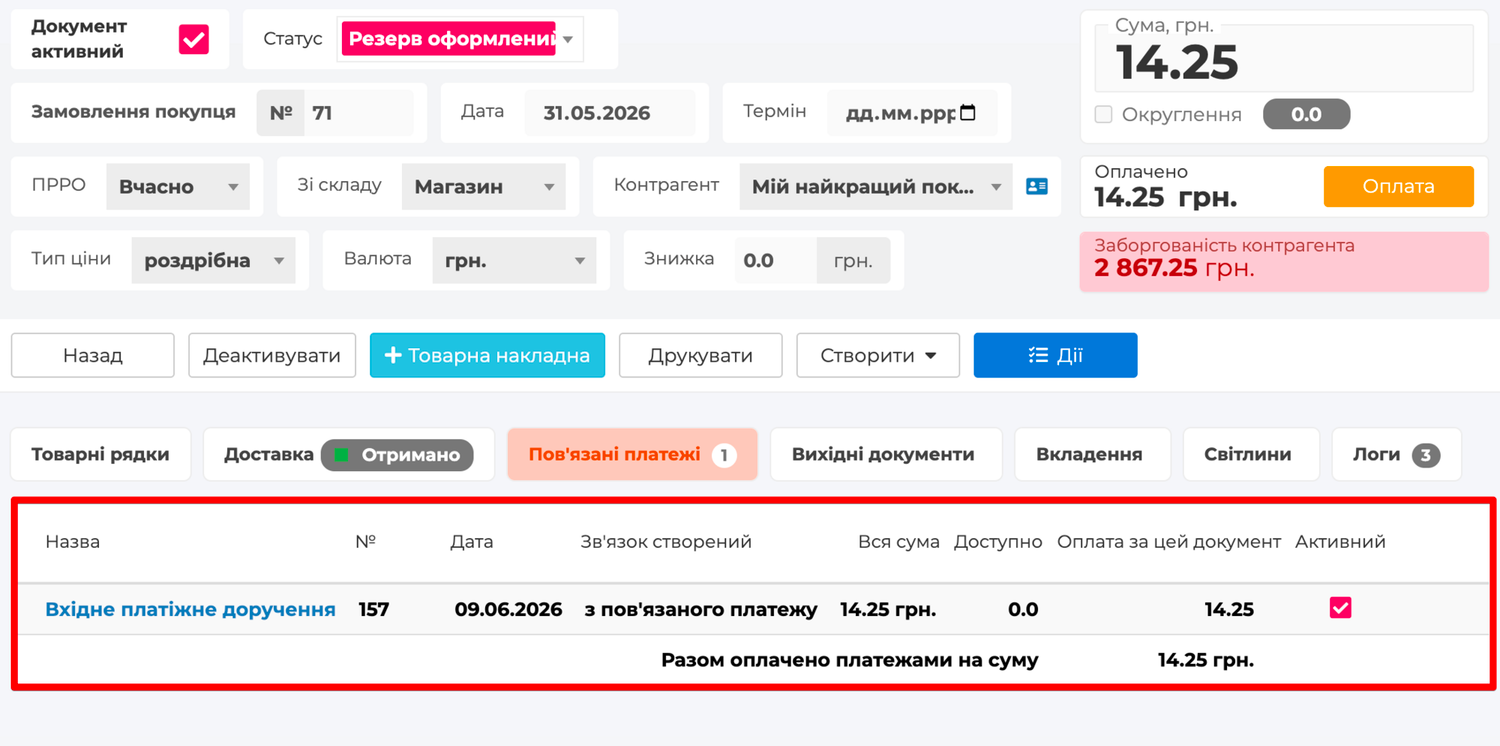
After cash on delivery is triggered, check the result in the document or order.
- The created incoming payment appears in the document.
- The delivery shows that cash on delivery is already linked to the payment.
- The payment shows the fiscalization status.
- After successful fiscalization, fiscal receipt actions are available.
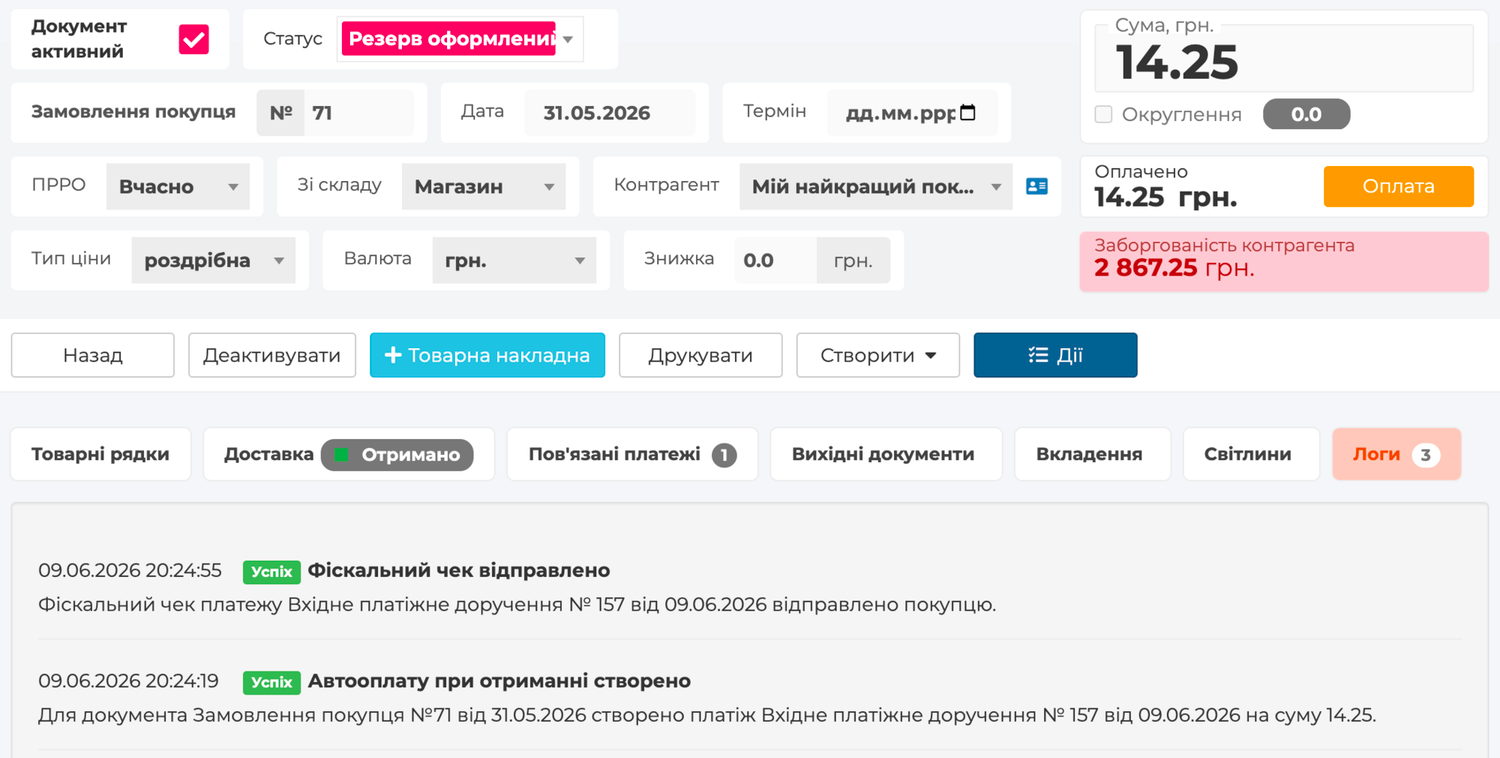
- The Logs tab shows system messages, skip reasons or automatic scenario errors.
Rules of correct cash on delivery
Nova Poshta cash on delivery works with real external payment confirmation, so it is important to preserve the exact link between the express waybill, document, payment and fiscal receipt.
- Delivery is the source of confirmation, not a fiscal document. It reports that the buyer received the parcel and paid the payment control amount.
- The payment is created only for the remaining amount due. If the document is already fully paid, cash on delivery does not create an extra payment.
- The Nova Poshta amount must match the remaining amount in Skynum. If the amounts differ, the document, payments and shipment terms need to be checked.
- After the express waybill is created, financial delivery terms are not edited. This protects the process from a situation where one amount was sent to Nova Poshta and another was later changed in Skynum.
- Automatic fiscalization is not part of payment creation. If the fiscal service is temporarily unavailable or configured incorrectly, Skynum does not roll back the created ERP payment.
- The return of such a sale is treated as a fiscal return of the sale or chain. Cash on delivery only creates and fiscalizes the payment; the sale return is performed according to fiscalization rules.
Quick check before shipment
- The Nova Poshta integration is active.
- Nova Poshta • Branch or Nova Poshta • Address is selected as the delivery method.
- The document or order is activated.
- The document has an unpaid remaining amount.
- The document currency is hryvnia.
- Payment control is enabled.
- The payment control amount is determined automatically or deliberately entered manually.
- After payment, automatically create an incoming payment is enabled.
- Payment method for the payment is selected.
- Payment fiscalization is enabled if the receipt must be created automatically.
- The correct PRRO is selected in the document.
- Taxes and payment methods are filled in the fiscal integration.
- The counterparty's phone or email is filled in if the receipt must be automatically sent to the buyer.
Summary
Nova Poshta cash on delivery in Skynum turns payment on receipt into a controlled ERP process. Nova Poshta confirms receipt and payment, Skynum creates an incoming payment for the remaining amount due, fiscalizes this payment according to the document settings and, if the fiscal service channels allow it, sends the receipt to the buyer.
This is especially important for sales with prepayment, a credit sales delivery note or final settlement after delivery. The sale remains complete: delivery confirms the payment event, the payment closes the financial remaining amount, and the fiscal receipt enters the correct fiscal history of the sale.