
"Base pay plus a percentage of sales" is the most common pay scheme for salespeople and managers. And the most troublesome for the accountant: at the end of the month you have to collect each cashier's receipts, pick out the right products, calculate the percentage and not mix up who gets which amount. With ten salespeople that is a day's work, and a mistake in someone's favour or against them is noticed at once.
In Skynum sales and salary are one accounting system. Every receipt at the cash register and every sales invoice already knows who issued it. So the percentage is not collected by hand: a rule is set once in the employee's card — which sales, which products, which month and what percentage — and from then on the salary calculation works out the amount every month by itself.
Simple rule: link the user to their employee card and add the "Відрядна зарплата, % від продажів" (piecework pay, % of sales) rule. From then on the percentage is calculated without your involvement.
This article continues the series on salary in Skynum. How to hire employees and get to the payout is covered in Salary: from the first employee to the payout. Here is everything about the percentage of sales; pay for manufactured products is covered in Piecework work order from production.
Whose sales: executor and owner
Every cash register receipt and every sales invoice has two fields — Owner and Executor. When a document is created, Skynum puts its creator into both fields; they can be changed afterwards. Say a manager creates an invoice and remains its owner, but sets the salesperson who handed over the goods as the executor.
Each field has its own rule:
- Відрядна зарплата, % від продажів (виконавець) — the executor rule: a percentage of the documents where the employee is the executor. For cashiers, salespeople, technicians.
- Відрядна зарплата, % від продажів (власник) — the owner rule: a percentage of the documents where they are the owner. For managers who handle clients and create invoices.
One person can have both rules if they both create sales and hand over goods.
Setting it up takes two steps: link the user to the employee card and add the rule to the card. In order below.
Step 1. Link the user to the employee
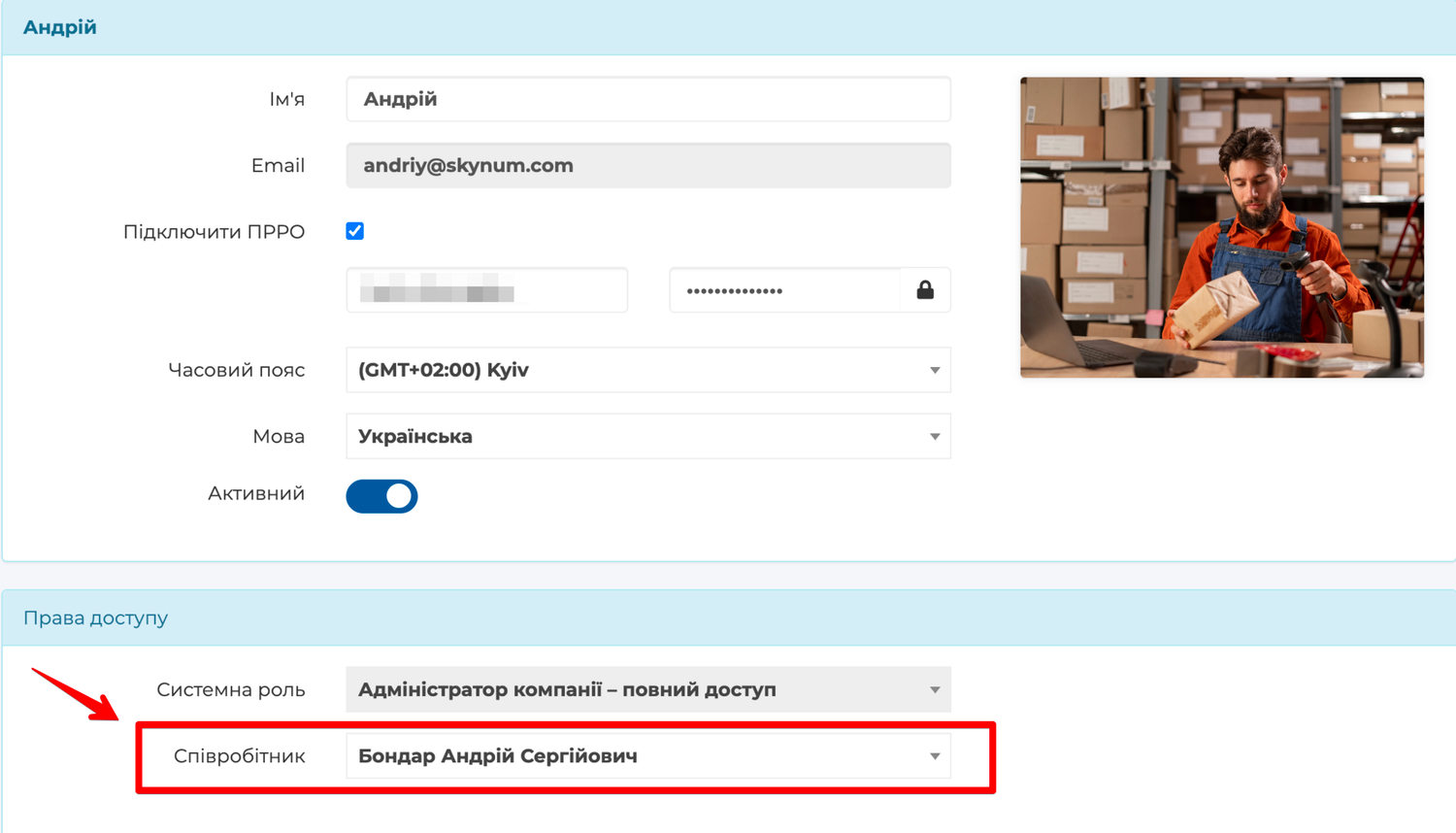
Sales belong to the user — the person who logs in to Skynum with their own login. Salary belongs to the employee — the card in the Salary → Personnel section. For the user's sales to get into the employee's salary, link them:
- Open Setting → Users and the card of the user who works at the cash register or creates invoices.
- In the Access rights block, in the Employee field, choose who this is.
- Save.
Do this before the start of the month for which you pay the percentage: only sales made by a user linked to an employee get into the calculation.
Step 2. Add the rule to the employee's card
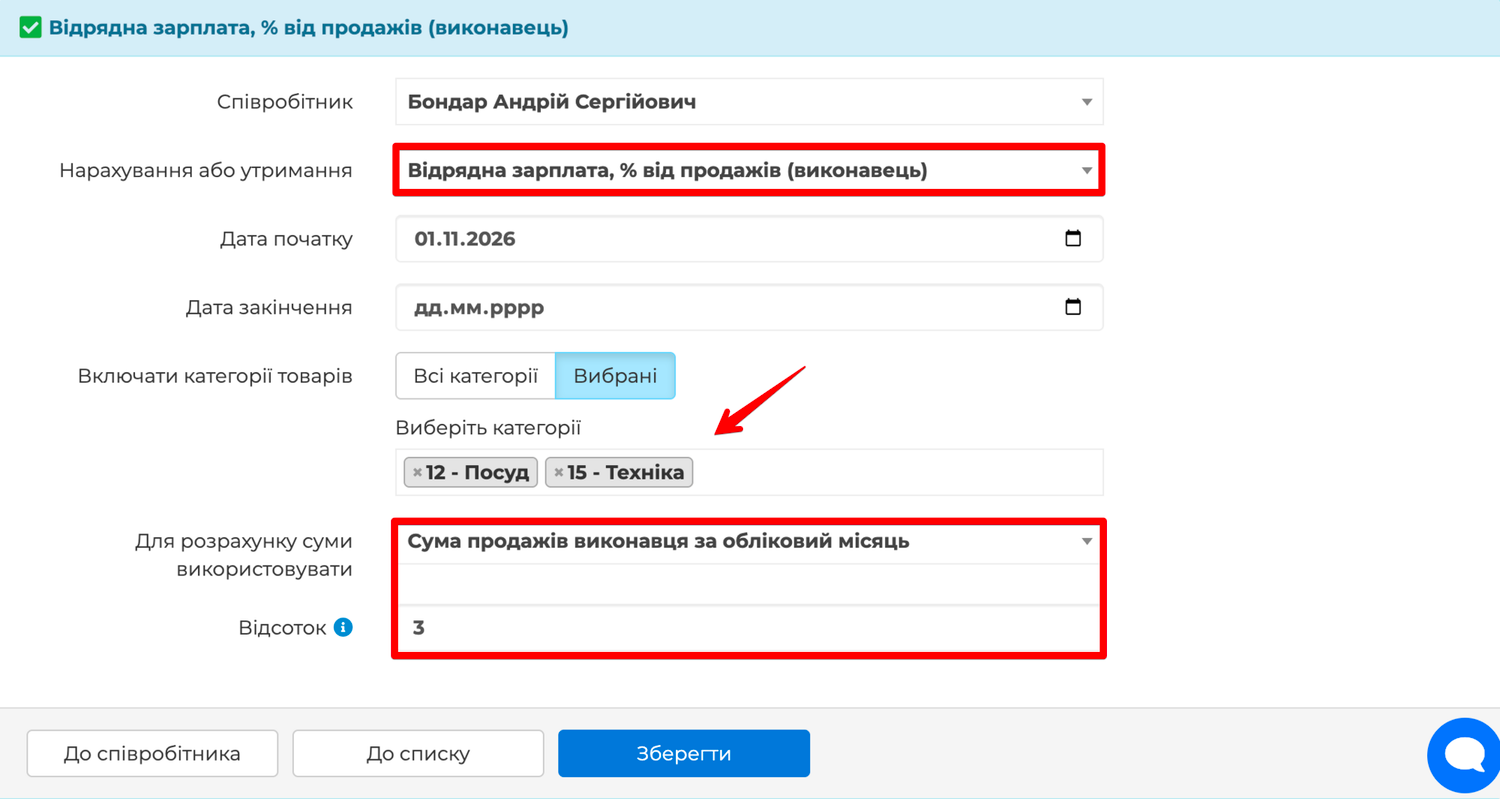
In the employee's card open the Payrolls tab, click Add and choose Відрядна зарплата, % від продажів (виконавець) or (власник). The rule card opens. Fill in:
- Start Date — the day from which the rule applies; today's date is set, change it if needed. Leave the End Date empty.
- Include product categories — All categories or Selected. For selected ones, tick the product groups the percentage is paid on in the Select categories field.
- To calculate the amount use — whose sales and for which month: Sales amount of the executor for the accounting month or for the last month; for the owner — the same two options.
- Percentage — the rate, for example 3.
Save. For "Selected" categories the list must not be empty — otherwise Skynum asks you to choose groups or set All categories.
Different percentages for different categories are set with several rules of the same kind: for example, 1% on "Consumables" and 3% on "Equipment". One category can be in only one rule for a given period, and a rule with All categories is the only one for its period: this way no sale is paid twice, and Skynum enforces it.
Accounting month or last month
The choice depends on when you close the salary:
- For the accounting month — the percentage for November goes into the November salary. Suits companies that calculate the salary after the month ends, when all sales are recorded.
- For the last month — the percentage on October sales goes into the November salary. Suits companies that calculate and pay the salary before the end of the month, while the current month's sales are still coming in.
The chosen option should stay fixed. If you do need to switch, do it at a month boundary so that no month of sales is counted twice or dropped:
- From accounting month to last month — close the old rule with an End Date on the last day of the month, and start the new one on the first day of the month after next. One month is left without a rule: its sales go into the following month under the new rule.
- From last month to accounting month — close the old rule on the last day of the month, start the new one on the first day of the next month. The percentage for the month whose sales no rule covered is accrued once with a payroll order — take the amount from the Percent of sales report.
What the calculation shows
At the end of the month, on the Paysheets tab, click Calculate — a "Відрядна зарплата, % від продажів (виконавець)" or "(власник)" line with the amount appears for the employee. If there were no sales in the month, there is no line.
A cashier with the executor rule, 1%, all categories, for the accounting month: in November sales of 5,500 were recorded at the register with him as executor — the November calculation shows a line of 55.00. With the "last month" rule the November calculation holds the percentage on October sales: 15,397 gives 153.97.
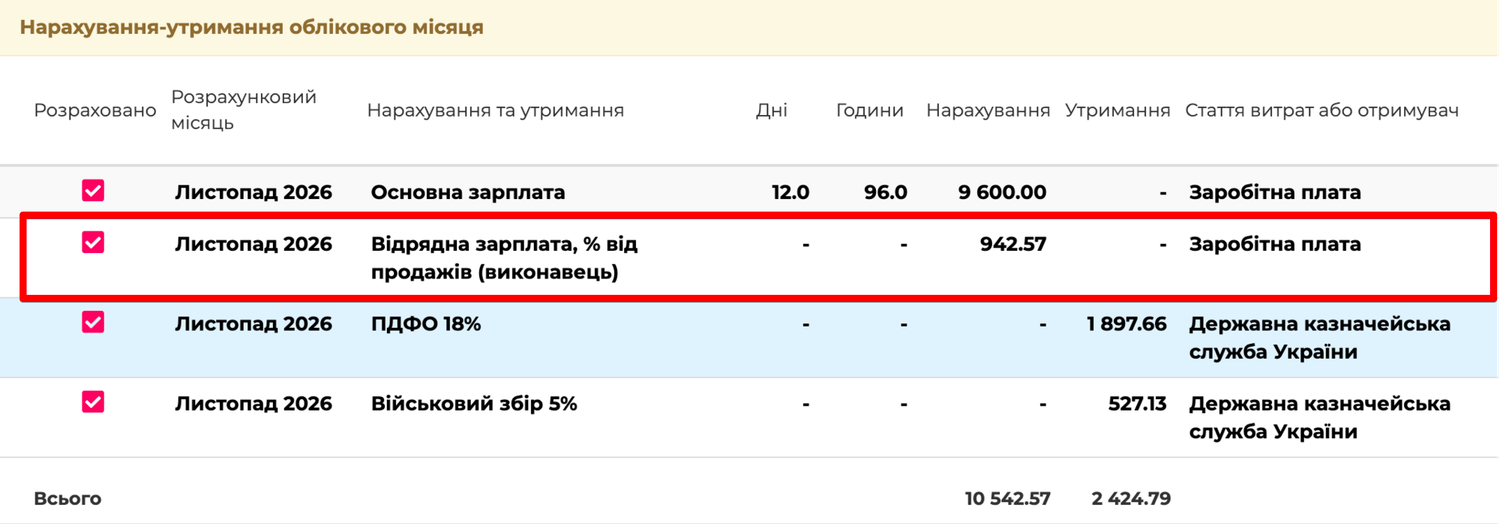
The percentage is part of the salary, so all deductions set up for the employee on the Payrolls tab are taken from it: personal income tax, the military levy, alimony if any — and the company accrues the unified social contribution on it. For an employee with the Piecework payment type this line, together with work orders, is the whole salary; with a monthly salary or pay per day or hour it is added to the basic pay.
The percentage can also be part of the advance: in Salary → Configuration → Parameter, in the Include accruals in advance payment calculations field, tick the piecework pay — and the advance covers the sales of the first half of the month.
Changes after the calculation
The percentage amount is calculated at the moment you click Calculate: from the sales that exist at that moment, under the rule in force in that month. While the calculation is not confirmed, every click on Calculate works the amount out afresh — so a receipt issued or cancelled after the first calculation, and a percentage changed in the rule, get into it.
Once you have confirmed the calculation with the Activate button, it is fixed: receipts, invoices and rules changed later no longer affect it — the salary is paid at the figures that were confirmed. If a change does need to be taken into account, cancel the confirmation on the Paysheets tab, click Calculate and confirm again.
That is why the percentage is not changed retroactively in the current rule. A new percentage is a new rule with the date it takes effect, and the old one is closed with an End Date: past months stay as they were paid, and from the new date the new rate applies.
Check what it was accrued from
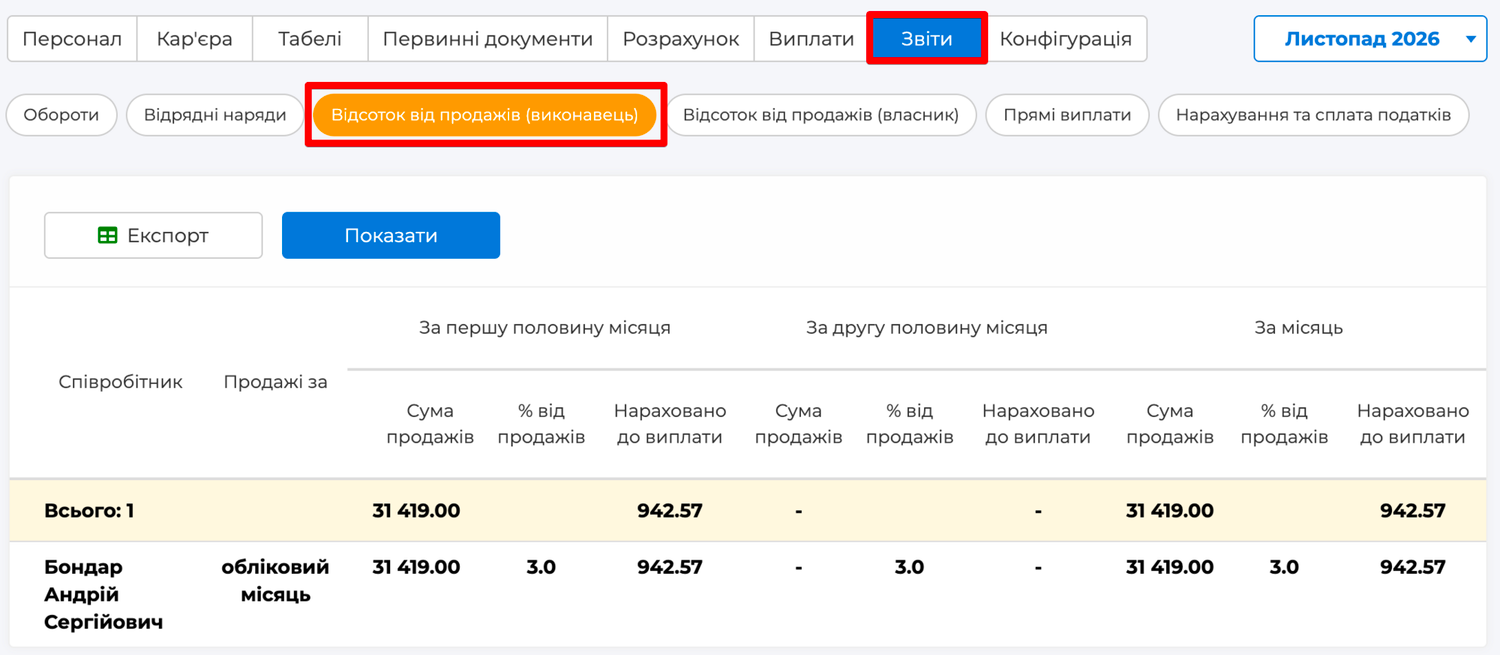
To see which amount the percentage was calculated from, open Salary → Reports → Percent of sales (executor) or Percent of sales (owner) — depending on the rule — and click Display. For each employee with such a rule you can see which month the sales are taken from and three groups of columns — for the first half of the month, the second half and the whole month: Sales amount, % of sales and Accrued for payment.
The report shows sales as they are now, while a confirmed calculation keeps the sales as of the moment of confirmation. If after the month was closed someone recorded or cancelled a sale retroactively, the report shows the new amount and the calculation shows the one that was paid. A difference between them for a past month is a sign of such changes, not of an error in the salary.
How it works in real life
Cashier: a percentage of all sales
A cashier gets 800 per shift and 1% of everything he rings up at the register. The accountant links the cashier's user to his card and adds the executor rule, 1%, all categories, for the accounting month. Every receipt the cashier closes goes into his total. At the end of the month the calculation shows the pay for shifts plus the percentage line, and the accountant collects nothing by hand.
Manager: a percentage of certain products only
A manager creates sales invoices for wholesale clients and gets 2% of sales in the "Equipment" category, but nothing on consumables. His card has the owner rule, Selected categories — "Equipment", 2%, for the accounting month. He is the owner in the invoices, so everything he sold from equipment goes into his percentage, and consumables do not.
Salary before the end of the month
The company pays salaries on the 28th, when the month is not over yet. To avoid calculating the percentage on incomplete sales, the salespeople's rules use Sales amount of the executor for the last month: the November salary carries the percentage for October, the December salary — for November. No sales are lost; the percentage arrives a month later.
A salesperson on percentage only, no base pay
A sales consultant is hired on percentage only: 5% of everything he sells. In the card, under the HR heading, the payment type is Piecework — there is no salary; on the Payrolls tab — the executor rule, 5%, all categories. His salary for the month is a single percentage line, from which Skynum withholds taxes as from any salary.
Practical rules
- Link users to employees before the first month with a percentage.
- Choose once which month to count — accounting or last — and do not change it within the year.
- For "Selected" categories, check that the list is not empty.
- If the amounts in the report and in the calculation for a past month differ, look for sales recorded retroactively.
- Close a rule that no longer applies with an End Date rather than deleting it: past months must stay as they were calculated.
Summary
The percentage of sales in Skynum does not have to be calculated — it is already calculated the moment the cashier closes a receipt or the manager posts an invoice. One rule in the card defines whose sales to take, from which products, for which month and at what percentage; the salary calculation picks up the amount itself, and the report shows which sales it is made of. Trade and salary are in one system — so the percentage always matches the cash register.